In-app browser = user frustration
Let’s face it, many visitors will reach our Squarespace website from within a mobile app like Instagram or Facebook. Sadly these apps have built-in browsers (known as “in-app browsers”) that don’t offer the same capabilities and features as standard web browsers like Chrome or Safari.
Put simply, these in-app browsers will cause frustration for users. They can break essential features on your Squarespace website - or any website! In particular, they cause problems with the checkout, payments and form submissions as well as slower load times and broken layouts. And yet, we have no control over which browser they use. We can't force the visitor to use a different browser!
Advise visitors to use a supported browser
As we have no control over the way an in-app browser works, and we can’t force them to use a supported browser, we need to tell them about the issue and encourage them to use a better browser on their mobile, like Safari or Chrome. To do this, I’ve written some code that detects if a visitor is using an in-app browser from Instagram or Facebook and then displays a simple message explaining how to use an external browser.
Here’s an example of the code working on this website. The message is displayed in a yellow box, although you can change the colours easily by editing the code.
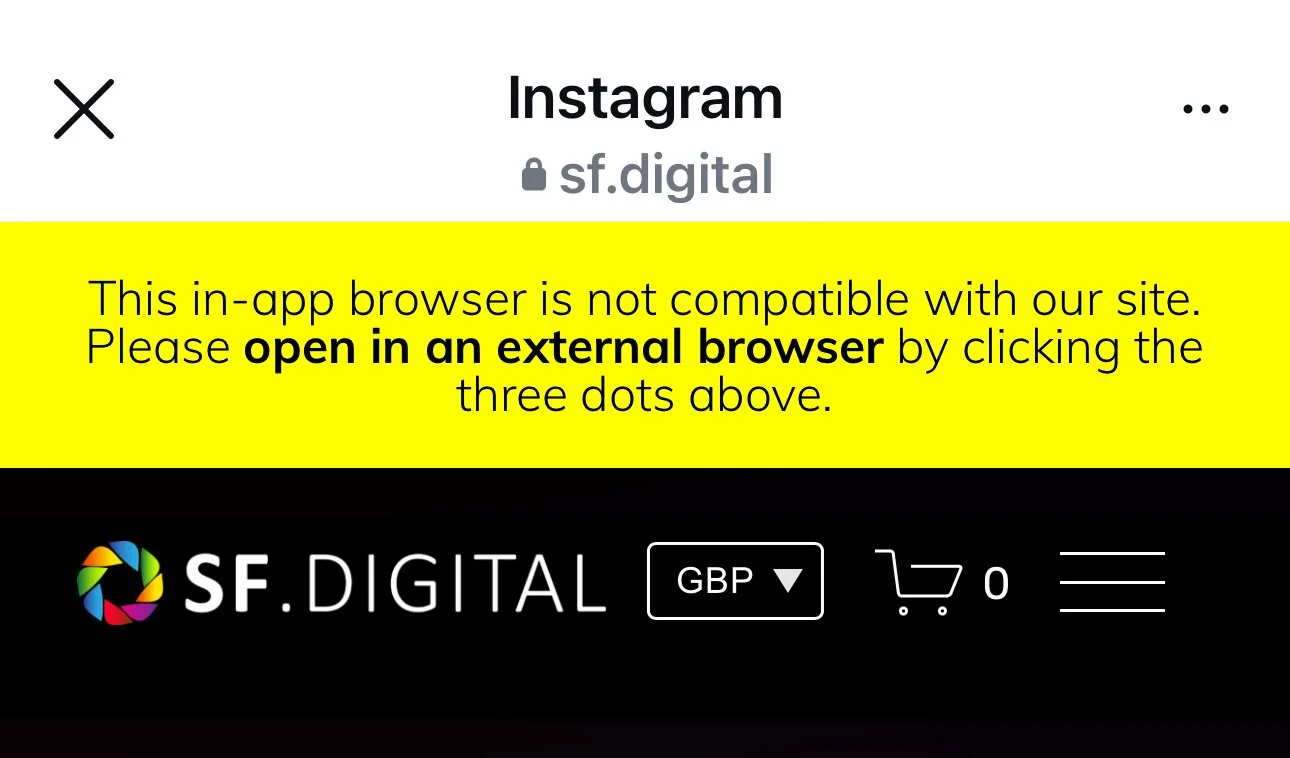
This message will only appear if the visitor is using an in app browser. They can then click the three dots to open the site in another browser, like this:
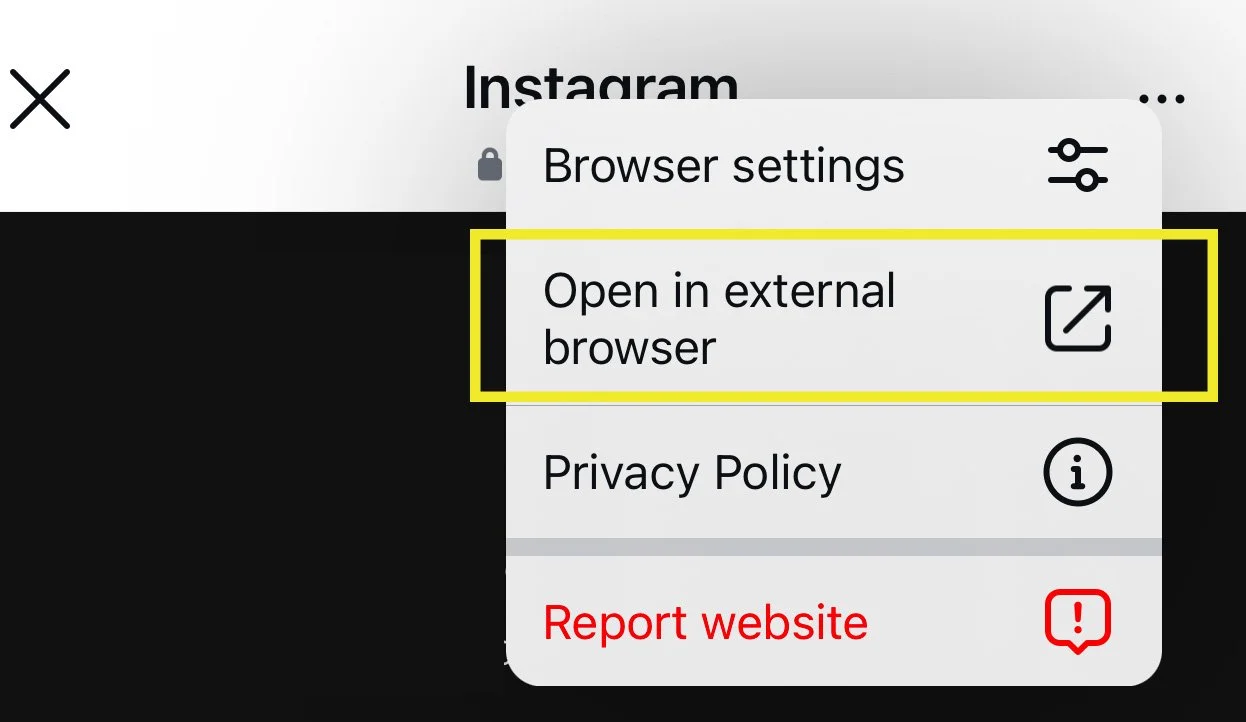
The visitor should then be able to use all the features on your Squarespace website, without errors.
Installing the code
The code can be added to any Squarespace website that’s on a Business billing plan or above (or in a trial). It won’t work on Personal billing plans because Squarespace have deliberately disabled certain features on this lower-cost plan.
To add the code, go to the Code Injection panel (here’s where you can find it) and paste the following code into the panel labelled FOOTER:
<!-- Show warning if visitor is using an in-app browser ----->
<!-- Copyright Soundfocus Digital Ltd [https://sf.digital] -->
<!-- Use freely in your code injection. Do NOT re-publish. -->
<script>
  document.addEventListener('DOMContentLoaded', function() {
    function sfIsInAppBrowser() {
      const ua = navigator.userAgent || navigator.vendor || window.opera;
      return (ua.indexOf('Instagram') > -1) || (ua.indexOf('FBAN') > -1) || (ua.indexOf('FBAV') > -1);
    }
    if (sfIsInAppBrowser()) {
      // Create the message div
      const message = document.createElement('div');
      message.style.backgroundColor = 'yellow';
      message.style.color = 'black';
      message.style.textAlign = 'center';
      message.style.padding = '17px';
      message.style.zIndex = '10000';
      message.innerHTML = 'This in-app browser is not compatible with our site. Please <b>open in an external browser</b> by clicking the three dots above.';
      const sfAb = document.querySelector('.sqs-announcement-bar-dropzone');
      if (sfAb) {
        sfAb.parentNode.insertBefore(message, sfAb);
      } else {
        document.body.insertBefore(message, document.body.firstChild);
      }
      if (sfAb) {
        sfAb.style.marginTop = `${message.offsetHeight}px`;
      } else {
        document.body.children[1].style.marginTop = `${message.offsetHeight}px`;
      }
    }
  });
</script>
After pasting the code and saving your changes, the feature should be enabled. To test it, open your Squarespace website in the Instagram or Facebook mobile app. You can edit the message and the colours to suit your requirements.
20% off Squarespace
If you haven’t signed up for Squarespace yet, you can get 20% off your first website subscription. This comes at no additional cost to you and helps support the Squarespace guidance that I provide for free.