
If you are using the built-in Newsletter Block in Squarespace, you may have found that the form usually asks for both a first name and a last name. For many websites this is unnecessary. In fact, requiring a last name (or “surname”) can create friction and reduce sign-ups. Most email marketing strategies only need a first name for personalisation, such as “Hi Sarah, here's your weekly update”.
Unfortunately, Squarespace does not provide a setting to hide the last name field from the Newsletter Block. This can be frustrating if you want to keep your sign-up form simple and encourage more visitors to subscribe.
The good news is that there is a straightforward workaround - hide the field using CSS.
A simple solution
If you’ve previously tried code snippets to solve this issue, you may have come unstuck because it added “fake” information to your mailing list (like a last name of “-”) or it didn’t work on your Basic/Personal billing plan.
The good news is that this solution works on all Squarespace sites. Since July 2025, Squarespace has provided a way to make the last name field optional. In the Newsletter Block settings, you’ll see that you can now toggle off the “Require Last Name” option:
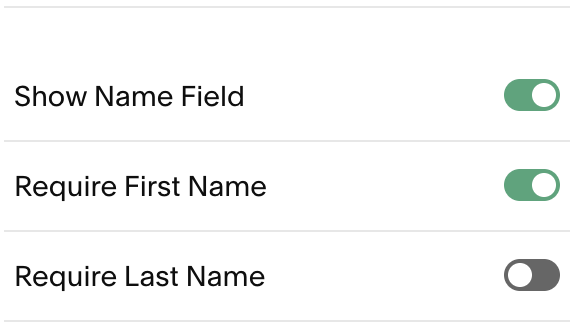
This solves part of the problem. Users no longer need to provide a last name. However, we also want to hide the last name field so that users do not see it. You can so this by adding some CSS to your site. Look for the Custom CSS panel (where is this?) and add the following:
/*
Tip by SF.DIGITAL
Hide the last name field in
Newsletter Blocks
*/
.newsletter-block .newsletter-form-field-wrapper.field.last-name {
  display: none;
}
After saving your changes, the newsletter form will only show:
First name
Email address
The last name field will no longer appear to visitors. Squarespace will still process submissions normally, and the last name value will simply be empty in your email list.
