
Fix the "Unable to Add Item" Error
If you sell products on Squarespace, there’s a good chance that at least one customer has seen this message while trying to add a product to their cart:
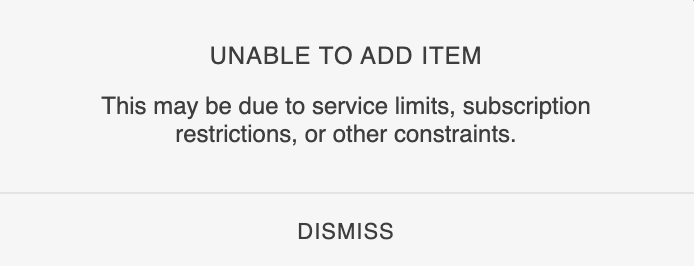
This error message is vague. It doesn’t explain what’s happening, why it happened or, most importantly, how the customer can resolve it.
In most cases, the customer has simply tried to add the same product to their cart twice.
Squarespace sensibly prevents duplicate purchases of download products, and the platform now offers a quantity limit feature that can restrict the purchase quantity of any product type. However, the wording of the error message makes it sound as though something is broken with your website.
If you're lucky, the potential will reach out to ask what's wrong but, in most cases, they'll assume your website is broken and buy from someone else.
User Experience is important
From a user experience perspective, customers shouldn't need to understand concepts such as "service limits", "subscription restrictions" or the technical rules behind how a product is configured. Those are implementation details that belong to the platform, not the customer.
Instead, the customer needs a simple explanation in plain language.
A cleaner fix
Instead of waiting for the confusing error message to appear, I’ve written a small code snippet that checks whether the product is already in the user’s cart.
If it is, the Add to Cart button is disabled and the button text changes to "Already in your cart" (or your choice of wording).
This creates a much clearer experience for customers by avoiding error messages that give impression that your store is malfunctioning.
The fix should work on most smaller Squarespace stores selling any type of product.
How to add this to your Squarespace website
You don’t need any coding experience to install this. Simply follow the steps below:
While logged into your Squarespace website, go to Website > Pages
Scroll to the bottom and open Website Tools
Choose Code Injection
Locate the Footer injection area
Paste the code snippet (below) into the Footer box
Click Save
That’s it. The change should start working immediately across your store.
If you’d like to restrict it to certain product types, such as download products, you can edit the productType in the code below. When set to “null” (the default) it will apply to all product types, or you can limit it as follows:
1 = physical
2 = download
3 = service
Code snippet
<!-- Start of Already in Cart plugin for Squarespace --------------------------------------->
<!-- Copyright 2026 Soundfocus Digital Ltd [https://sf.digital] ---------------------------->
<script>
(function () {
  var inCartLabel = 'Already in your cart';

  var productType = null;

  const _0x1fb3e5=_0x4cdb;(function(_0x15eb96,_0x43b938){const _0x894fea=_0x4cdb,_0x40ceb6=_0x15eb96();while(!![]){try{const _0x3cd76e=-parseInt(_0x894fea(0x18f))/0x1*(parseInt(_0x894fea(0x18c))/0x2)+parseInt(_0x894fea(0x189))/0x3+-parseInt(_0x894fea(0x190))/0x4+parseInt(_0x894fea(0x18e))/0x5+parseInt(_0x894fea(0x197))/0x6*(-parseInt(_0x894fea(0x18b))/0x7)+-parseInt(_0x894fea(0x184))/0x8*(parseInt(_0x894fea(0x185))/0x9)+parseInt(_0x894fea(0x1a4))/0xa*(parseInt(_0x894fea(0x198))/0xb);if(_0x3cd76e===_0x43b938)break;else _0x40ceb6['push'](_0x40ceb6['shift']());}catch(_0x295e7d){_0x40ceb6['push'](_0x40ceb6['shift']());}}}(_0x4b22,0xb18c6));function isTargetProduct(_0x5bdef0){if(!_0x5bdef0)return![];if(productType===null)return!![];return _0x5bdef0['productType']===productType;}function getProductIds(_0x26585d){const _0xa5a638=_0x4cdb;return[_0x26585d['id'],_0x26585d['firstInStockVariant']?.['id'],...(_0x26585d[_0xa5a638(0x199)]||[])['map'](_0x16c508=>_0x16c508['id'])]['filter'](Boolean);}async function getCartItemIds(){const _0x579457=_0x4cdb,_0x1f4a8a=await fetch(_0x579457(0x19f))[_0x579457(0x18a)](_0x165c8c=>_0x165c8c['json']())[_0x579457(0x1a6)](()=>null),_0x5b06d3=new Set();return(_0x1f4a8a?.['entries']||[])[_0x579457(0x18d)](_0x3f1eac=>{const _0x149476=_0x579457;if(_0x3f1eac[_0x149476(0x1a1)])_0x5b06d3['add'](_0x3f1eac[_0x149476(0x1a1)]);if(_0x3f1eac[_0x149476(0x181)])_0x5b06d3[_0x149476(0x1a0)](_0x3f1eac['productId']);if(_0x3f1eac['variantId'])_0x5b06d3[_0x149476(0x1a0)](_0x3f1eac['variantId']);}),_0x5b06d3;}function markInCart(_0x3ce577){const _0x23aef1=_0x4cdb;if(!_0x3ce577||_0x3ce577[_0x23aef1(0x192)]['sfInCartMarked']===_0x23aef1(0x19c))return;_0x3ce577[_0x23aef1(0x192)][_0x23aef1(0x193)]=_0x23aef1(0x19c),_0x3ce577[_0x23aef1(0x180)]=!![];const _0x4512f2=_0x3ce577['querySelector'](_0x23aef1(0x1a5));if(_0x4512f2)_0x4512f2[_0x23aef1(0x19b)]=inCartLabel;}function productIsInCart(_0x1d3e3e,_0x4c7f81){const _0x202fa8=_0x4cdb;return getProductIds(_0x1d3e3e)['some'](_0x513327=>_0x4c7f81[_0x202fa8(0x194)](_0x513327));}async function updatePdpButton(_0x379230){const _0x35f795=_0x4cdb,_0x8f3c=window[_0x35f795(0x19e)]?.[_0x35f795(0x186)]?.[_0x35f795(0x191)]||window['Static']?.[_0x35f795(0x186)]?.[_0x35f795(0x196)];if(!isTargetProduct(_0x8f3c))return;if(!productIsInCart(_0x8f3c,_0x379230))return;const _0x4a3288=document[_0x35f795(0x195)](_0x35f795(0x187));markInCart(_0x4a3288);}function _0x4b22(){const _0x4f2dfc=['productId','querySelectorAll','closest','875672wQrWSN','18qzcjpm','SQUARESPACE_CONTEXT','.sqs-add-to-cart-button','parse','3346245DfNwCa','then','61215qzosEK','1644bpUjke','forEach','2271955lMEuAF','743EmlyZg','2960680lccLLm','product','dataset','sfInCartMarked','has','querySelector','item','726WDIaWr','2167VNlOrc','variants','.product-block[data-product],\x20.sqs-block-product[data-product]','textContent','true','addEventListener','Static','/api/commerce/shopping-cart','add','itemId','click','target','90630FQmYTI','.add-to-cart-text','catch','disabled'];_0x4b22=function(){return _0x4f2dfc;};return _0x4b22();}async function updateProductBlockButtons(_0xee246e){const _0x33efc4=_0x4cdb;document[_0x33efc4(0x182)](_0x33efc4(0x19a))[_0x33efc4(0x18d)](_0x2e2728=>{const _0x305455=_0x33efc4;try{const _0x1fbaeb=JSON[_0x305455(0x188)](_0x2e2728['dataset'][_0x305455(0x191)]);if(!isTargetProduct(_0x1fbaeb))return;if(!productIsInCart(_0x1fbaeb,_0xee246e))return;const _0x49ee97=_0x2e2728[_0x305455(0x195)](_0x305455(0x187));markInCart(_0x49ee97);}catch(_0x245035){}});}async function updateAllButtons(){const _0x3f1584=await getCartItemIds();updatePdpButton(_0x3f1584),updateProductBlockButtons(_0x3f1584);}function _0x4cdb(_0x549bc9,_0x126d21){_0x549bc9=_0x549bc9-0x180;const _0x4b2240=_0x4b22();let _0x4cdbe4=_0x4b2240[_0x549bc9];return _0x4cdbe4;}updateAllButtons(),document[_0x1fb3e5(0x19d)](_0x1fb3e5(0x1a2),function(_0x434c3c){const _0x20abc3=_0x1fb3e5;_0x434c3c[_0x20abc3(0x1a3)][_0x20abc3(0x183)](_0x20abc3(0x187))&&(setTimeout(updateAllButtons,0x5dc),setTimeout(updateAllButtons,0xbb8));});
})();
</script>
<!-- End of Already in Cart plugin for Squarespace ----------------------------------------->
Why this issue matters
The purpose of this guide is to highlight a usability issue that has been reported but that has not been addressed. Small usability issues like this can quietly hurt conversion rates, so it is important they are fixed in a timely manner.
When customers see vague or technical error messages during checkout, confidence drops quickly. Even though Squarespace is technically behaving correctly here, the messaging creates unnecessary friction during what should be the simplest part of the buying process.
A small improvement like replacing the generic error with a clear “Already in your cart” message should make the buying experience feel far more polished and intentional.
