
How to customise the Squarespace cookie manager popup
The customisation problem nobody talks about
If you've spent any time configuring cookies on a Squarespace site, you'll know that the platform gives you a reasonable degree of control over the initial cookie banner - the popup that greets first-time visitors with Accept, Decline, and Manage buttons.
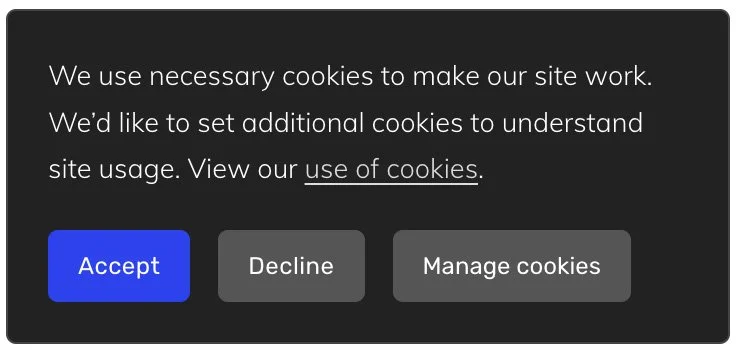
You can adjust the text, tweak the styling, and align it to your brand without too much trouble. The cookie manager, however, is a different story entirely.
What is the cookie manager?
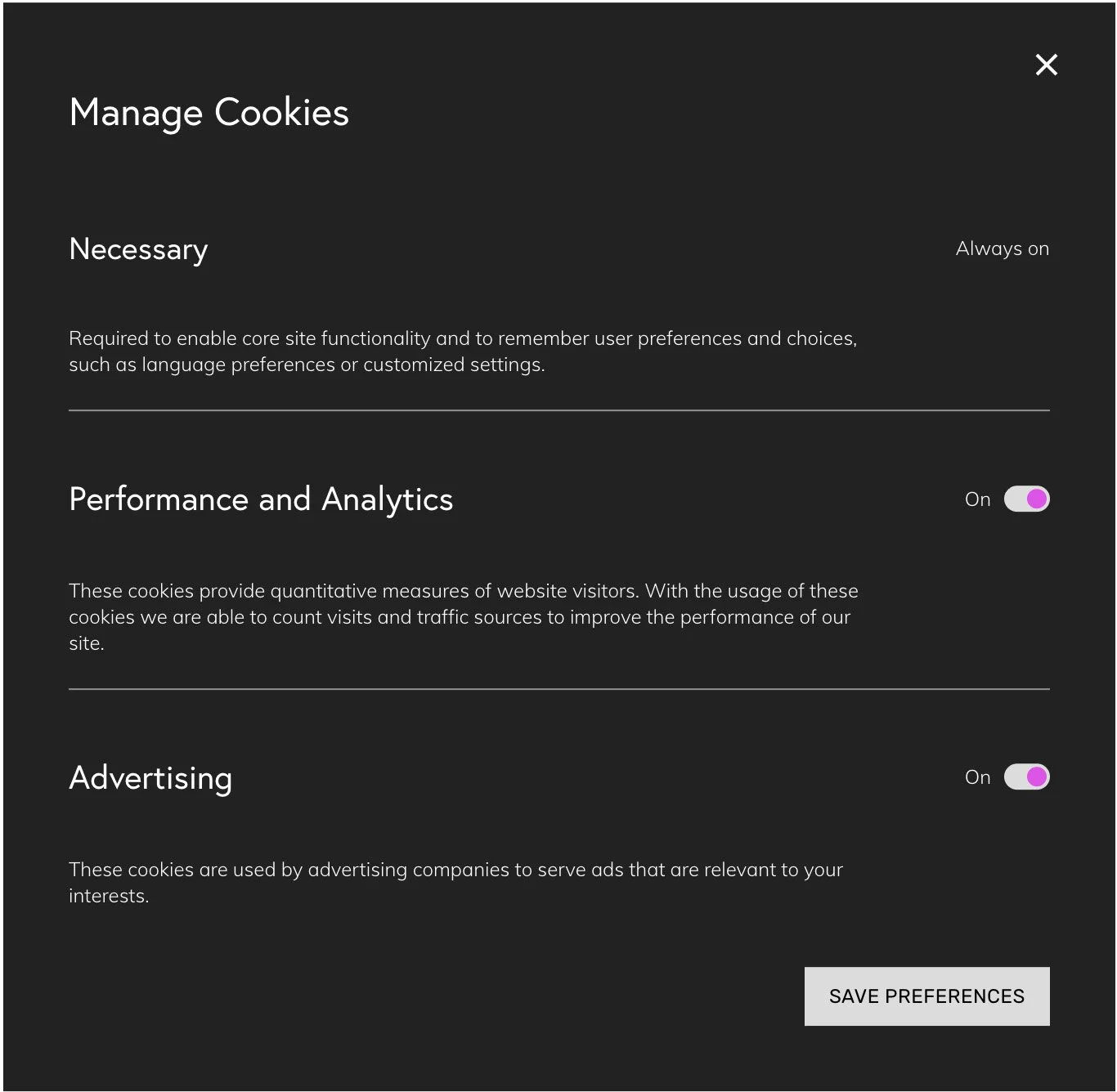
When a visitor clicks "Manage Cookies" on the initial popup, or returns later via the "Cookie Preferences" button in the footer, Squarespace opens a modal dialog listing three cookie categories:
Necessary
Performance and Analytics
Advertising
Visitors to your website can toggle the optional categories on or off before saving their preferences.
The problem: no customisation options
Overall, the cookie manager has a sensible user experience but Squarespace doesn’t provide any way to customise the content. None.
The category titles, the descriptive text beneath each one, and the set of categories shown are all hard-coded by the platform. This creates two real-world problems.
The text may not match your brand voice. The descriptions are generic, legalistic, and written to cover generic Squarespace sites. If you've put effort into writing a clear, honest privacy policy in plain language, the default cookie manager could undercut that tone.
The Advertising category is always shown. Even if your website doesn't run any advertising or use any third-party ad tracking - which is true of many websites - Squarespace still presents an "Advertising toggle to your visitors. At best this is confusing; at worst it is misleading and could erode trust rather than building it.
The solution: some custom code
To work around these limitations, I've put together a free plugin that you can add to your site's code injection panel.
The plugin lets you:
Rename any category. You could replace "Performance and Analytics" with simply "Analytics" if that better fits your content.
Override the description of any category, using your own words.
Hide the Advertising category entirely, including its toggle, description, and the separator rule
Rename the dialog title and the save button
You can adjust each element by changing the settings at the top of the code.
Installing the plugin
Paste the code below the Code Injection Footer. If you don’t know where to find this, check this guide: Where is the Code Injection panel?
After you have pasted the plugin code, it is time to customise the settings.
You can do this by editing the CONFIG section at the top of the code, to meet your needs (further details below the code).
<!-- Start of Cookie Manager Customisation Plugin for Squarespace ---------------------------->
<!-- Copyright 2026 Soundfocus Digital Ltd [https://sf.digital] ------------------------------>
<!-- You may use this on your Squarespace website but you may not re-publish this code ------->
<script>
(function () {
  const CONFIG = {
    managePanel: {
      // Override the Manage Cookies title. Leave as null if no change.
      title: null,
      // Override the save button label ("Save Preferences")
      saveButtonText: null,
      // Category overrides to change title, description and optionally hide.
      // hide: true will hide the advertising category and its separator
      categories: [
        {
          match:       ['necessary', 'nécessaire'],
          title:       'Essential',
          description: 'Required to enable core site functionality and to remember user preferences and choices, such as language preferences or customised settings.',
        },
        {
          match:       ['performance', 'analytics', 'analyses'],
          title:       'Analytics',
          description: 'We use analytics cookies to understand how visitors use our site.',
        },
        {
          match:       ['advertising', 'publicité'],
          hide:        true,
        },
      ],
    },
  };
const _0x57b486=_0x2e84;(function(_0xf2442c,_0x2054b6){const _0x26319e=_0x2e84,_0x12bda4=_0xf2442c();while(!![]){try{const _0x491830=parseInt(_0x26319e(0x7d))/0x1*(parseInt(_0x26319e(0x86))/0x2)+-parseInt(_0x26319e(0x77))/0x3*(-parseInt(_0x26319e(0xa4))/0x4)+-parseInt(_0x26319e(0x83))/0x5+-parseInt(_0x26319e(0x8e))/0x6+parseInt(_0x26319e(0x9c))/0x7+parseInt(_0x26319e(0x9e))/0x8*(parseInt(_0x26319e(0xa2))/0x9)+-parseInt(_0x26319e(0x93))/0xa*(-parseInt(_0x26319e(0x8d))/0xb);if(_0x491830===_0x2054b6)break;else _0x12bda4['push'](_0x12bda4['shift']());}catch(_0x45f977){_0x12bda4['push'](_0x12bda4['shift']());}}}(_0x54a3,0x188f2),console[_0x57b486(0x81)](_0x57b486(0x85)));function _0x54a3(){const _0x167163=['h3\x20.fs-unmask','style','hide','matches','244398dkIZbt','trim','12224zjEOCE','nextElementSibling','.button-group','match','9EPQYVm','previousElementSibling','28BiKtXo','categories','observe','36375lHMWAC','categoryDesc','managePanel','manageOverlay','h4\x20.fs-unmask','display','453aJVgdf','sfCustomised','categoryTitle','tagName','log','overlayTitle','251790yyaGlb','saveButtonText','🟣\x20Cookie\x20Manager\x20Customisation\x20plugin\x20v1.4\x20by\x20SF.DIGITAL\x20[https://sf.digital]','202lyziWj','title','textContent','toLowerCase','description','p.category-description','dataset','910393ZnWQgg','593286bXBHEM','querySelectorAll','none','.manage-cookies-overlay','.button-group\x20.save\x20.fs-unmask','10NqRNBq','.category-selection','querySelector','categoryBlock','some'];_0x54a3=function(){return _0x167163;};return _0x54a3();}function _0x2e84(_0x3102dc,_0x26e38e){_0x3102dc=_0x3102dc-0x75;const _0x54a393=_0x54a3();let _0x2e848a=_0x54a393[_0x3102dc];return _0x2e848a;}const SEL={'manageOverlay':_0x57b486(0x91),'overlayTitle':_0x57b486(0x98),'categoryBlock':_0x57b486(0x94),'categoryTitle':_0x57b486(0x7b),'categoryDesc':_0x57b486(0x8b),'saveButton':_0x57b486(0x92)};function sfFindCategoryConfig(_0x3c8336){const _0x28237a=_0x57b486;let _0x5da0da=_0x3c8336[_0x28237a(0x89)]();return CONFIG[_0x28237a(0x79)][_0x28237a(0x75)]['find'](_0x5836d3=>_0x5836d3[_0x28237a(0xa1)][_0x28237a(0x97)](_0x3936bd=>_0x5da0da['includes'](_0x3936bd['toLowerCase']())))||null;}function sfFindDescriptionAfter(_0x158807){const _0x76dde5=_0x57b486;let _0x14fb3d=_0x158807[_0x76dde5(0x9f)];for(;_0x14fb3d;){if(_0x14fb3d['matches'](SEL[_0x76dde5(0x78)]))return _0x14fb3d;if(_0x14fb3d['matches'](SEL[_0x76dde5(0x96)])||_0x14fb3d[_0x76dde5(0x9b)](_0x76dde5(0xa0)))break;_0x14fb3d=_0x14fb3d[_0x76dde5(0x9f)];}return null;}function sfFindAdjacentHr(_0x3293d3,_0x25819d){const _0x4e82cb=_0x57b486;let _0x476a4e=_0x3293d3[_0x4e82cb(0xa3)];if(_0x476a4e&&'HR'===_0x476a4e['tagName'])return _0x476a4e;let _0x385f92=(_0x25819d||_0x3293d3)['nextElementSibling'];return _0x385f92&&'HR'===_0x385f92[_0x4e82cb(0x80)]?_0x385f92:null;}function sfApplyCategoryCustomisations(_0x185c73){const _0x2cf51e=_0x57b486;_0x185c73[_0x2cf51e(0x8f)](SEL[_0x2cf51e(0x96)])['forEach'](_0x4721cb=>{const _0x45e651=_0x2cf51e;let _0x38e8fe=_0x4721cb[_0x45e651(0x95)](SEL[_0x45e651(0x7f)]);if(!_0x38e8fe)return;let _0x24f743=sfFindCategoryConfig(_0x38e8fe['textContent'][_0x45e651(0x9d)]());if(!_0x24f743)return;let _0x514bd5=sfFindDescriptionAfter(_0x4721cb);if(_0x24f743[_0x45e651(0x9a)]){_0x4721cb['style'][_0x45e651(0x7c)]=_0x45e651(0x90),_0x514bd5&&(_0x514bd5['style'][_0x45e651(0x7c)]=_0x45e651(0x90));let _0x58d693=sfFindAdjacentHr(_0x4721cb,_0x514bd5);_0x58d693&&(_0x58d693[_0x45e651(0x99)][_0x45e651(0x7c)]=_0x45e651(0x90));return;}if(_0x24f743[_0x45e651(0x87)]&&(_0x38e8fe[_0x45e651(0x88)]=_0x24f743[_0x45e651(0x87)]),_0x24f743[_0x45e651(0x8a)]&&_0x514bd5){let _0x13ba9b=_0x514bd5[_0x45e651(0x95)]('.fs-unmask')||_0x514bd5;_0x13ba9b[_0x45e651(0x88)]=_0x24f743[_0x45e651(0x8a)];}});}function sfProcessManageOverlay(_0xed07be){const _0x38170e=_0x57b486;if(_0xed07be[_0x38170e(0x8c)][_0x38170e(0x7e)])return;if(_0xed07be[_0x38170e(0x8c)][_0x38170e(0x7e)]='1',CONFIG[_0x38170e(0x79)]['title']){let _0x4dd785=_0xed07be[_0x38170e(0x95)](SEL[_0x38170e(0x82)]);_0x4dd785&&(_0x4dd785[_0x38170e(0x88)]=CONFIG[_0x38170e(0x79)][_0x38170e(0x87)]);}if(CONFIG[_0x38170e(0x79)][_0x38170e(0x84)]){let _0xfd8d69=_0xed07be['querySelector'](SEL['saveButton']);_0xfd8d69&&(_0xfd8d69[_0x38170e(0x88)]=CONFIG['managePanel']['saveButtonText']);}sfApplyCategoryCustomisations(_0xed07be);let _0x416f0d=new MutationObserver(()=>{_0x416f0d['disconnect'](),sfApplyCategoryCustomisations(_0xed07be),_0x416f0d['observe'](_0xed07be,{'childList':!0x0,'subtree':!0x0});});_0x416f0d[_0x38170e(0x76)](_0xed07be,{'childList':!0x0,'subtree':!0x0});}new MutationObserver(_0x48bf2b=>{for(let {addedNodes:_0x419514}of _0x48bf2b)_0x419514['forEach'](_0x228152=>{const _0xcd9ac=_0x2e84;if(!(_0x228152 instanceof HTMLElement))return;if(_0x228152[_0xcd9ac(0x9b)](SEL[_0xcd9ac(0x7a)])){sfProcessManageOverlay(_0x228152);return;}let _0x15f32d=_0x228152[_0xcd9ac(0x95)](SEL[_0xcd9ac(0x7a)]);_0x15f32d&&sfProcessManageOverlay(_0x15f32d);});})['observe'](document['body'],{'childList':!0x0,'subtree':!0x0});const overlay=document['querySelector'](SEL[_0x57b486(0x7a)]);overlay&&sfProcessManageOverlay(overlay);
})();
</script>
<!-- End of Cookie Manager Customisation Plugin for Squarespace ------------------------------>
If any value is set to null, the text will not be changed. If you want to change the title or description, replace the word null with some quotation marks and place your text into them.
For example, the default title for the popup is Manage Cookies. If you change title: null, to title: “Cookie Manager”, this will update the title of the popup.
In the example below, the Advertising category has been removed entirely, by setting hide to true. If you change this to false, the Advertising option will appear.
The snippet is free to use on any Squarespace site. If you wish to share this with others, please share a link to this page; please do not re-publish the code elsewhere.
