
TL;DR: "Wishlist" is a word that describes at least three different customer journeys. Before you compare features of different plugins, determine which journey you are building:
Save it and buy it later, online: You need a Favourites plugin. The heart icon saves items to the shopper's device and your Squarespace checkout stays exactly as it is.
Shortlist several items and send the list to you: You need a Wishlist plugin. The customer builds a list and submits it. You reply personally, quote, book an appointment, or take payment offline. Ideal for rental websites.
Ask about one specific high-value item: You need a Product Enquiry Form. An Enquire button on the product replaces (or sits beside) Add to Cart and opens a form you designed once.
If you choose the wrong one, your plugin may work perfectly while doing the wrong job for your business. This guide shows you how to tell them apart.
The problem with the phrase "wishlist"
Search "Squarespace wishlist plugin" and almost every result assumes you want the same thing: an Amazon-style favourites list. A heart on every product, a saved list, a return visit, a purchase. It’s a useful pattern but it is only one of the journeys people are searching for.
I have been a Squarespace Developer since 2007 and have been designing and building wishlist plugins for Squarespace since 2018. Here is what the people are actually building:
a wedding dress shortlist to send ahead of a fitting
a rental enquiry for an event hire company
a trade quotation for a B2B buyer
a made-to-order request
a furniture shortlist for an interior project
a florist consultation
a kitchen design enquiry
an enquiry about a high value wristwatch or jewelry
Only one item on that list ends with an online card payment. The others lead to a conversation that results in a higher-value transaction.
That distinction - not the position of the heart icon, not whether the panel slides in from the right - is the thing that determines whether the plugin you buy will actually make you money.
Stop comparing features. Compare customer journeys.
You will find plenty of feature tables on other websites, and it is easy to see why people build them. A grid of ticks and crosses can be seductive because it looks objective. It gives you a comfortable feeling of having done your homework.
The trouble is that a feature table can only be honest if every product in it is trying to do the same job. They aren’t.
So the useful question is not which plugin has the most ticks in a feature table.
It is - “What do I want to happen at the moment the customer stops browsing?”
Answer that, and the choice becomes obvious.
It’s also worth asking:
Who actually wrote the plugin? A trusted developer, or AI?
How long have they been building for Squarespace?
Who fixes it when the platform changes?
Favourites journey - save it now, buy it later.
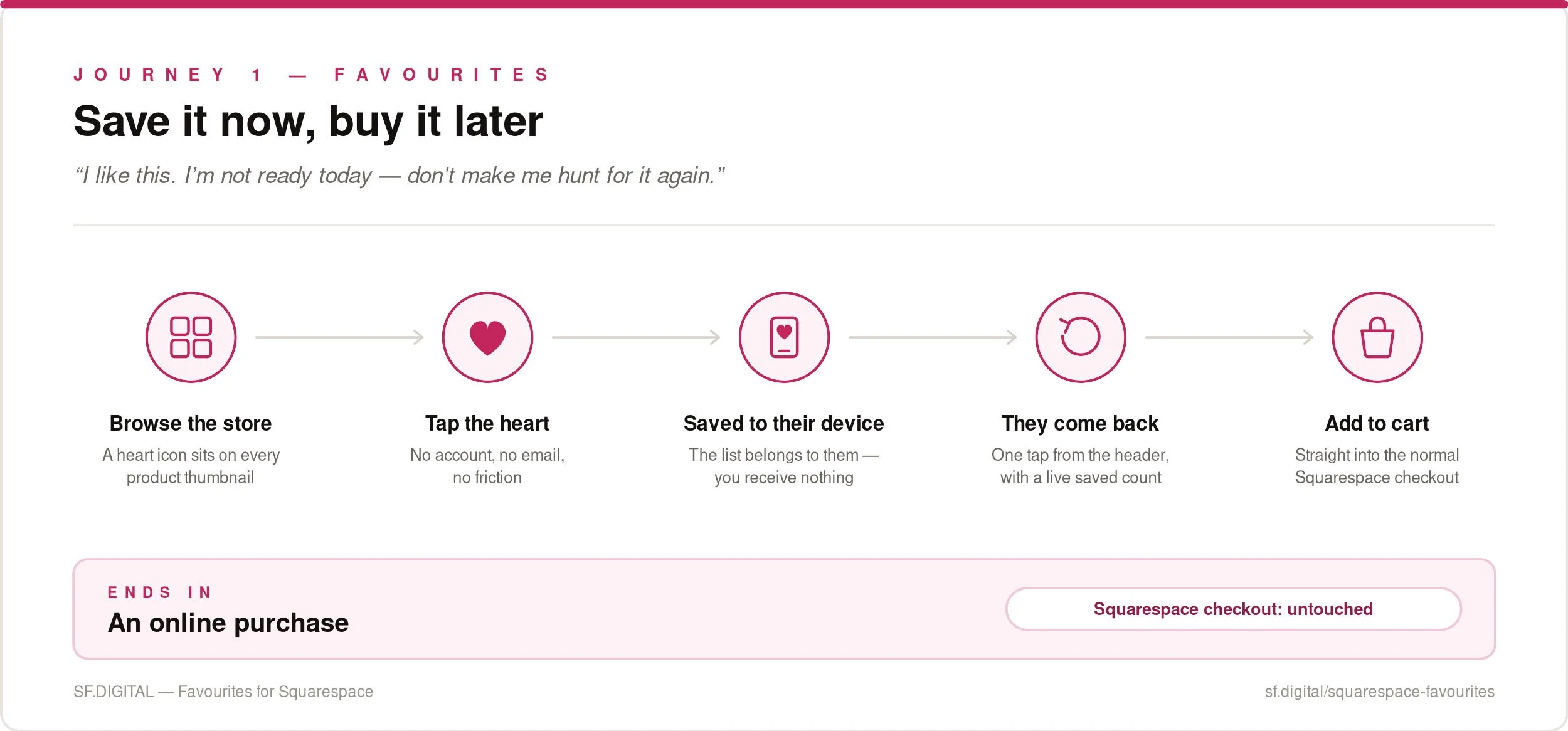
The customer's intent: "I like this. I'm not ready today. Don't make me hunt for it again."
Who this suits: conventional online stores selling in-stock products at listed prices — fashion, homeware, jewellery, food and drink, gifts, art prints, anything with a working Add to Cart button.
How it works: Our Favourites plugin adds a heart icon to every product thumbnail on every Store page (also known as the Product List Page or PLP). It is a clear call to action, designed to encourage visitors to use the feature immediately. Shoppers can favourite many items quickly, without reading the product details and without registering for an account.
That last part matters more than it sounds. Users are reluctant to adopt a feature if they think an account is required, so we removed that interaction cost entirely by saving the list directly to the visitor's device.
On the Product Details Page (PDP), a favourites button sits right beside Add to Cart. UX testing consistently shows this is where people look for it. The caption is fully customisable ("Add to wishlist", "Add to favorites", "Add to my list") and the icon fills once an item is saved.
A heart icon in the site header, next to the cart, makes the feature discoverable and shows a running count. Clicking it opens the favourites page where all the favourites are listed. Tapping a product thumbnail returns the shopper to the Product Details Page (PDP), where they choose a size or colour and add it to the cart as normal.
Why it works commercially: Research consistently shows that favouriting creates a psychological connection with the site. Visitors who feel a store caters to their preferences are more likely to return. Studies also show that returning to a saved list and seeing a product again frequently triggers an impulse purchase.
Your Squarespace cart and checkout are untouched. Favourites sits alongside your normal buying process rather than replacing it.
Wishlist journey - Shortlist it and send it to me
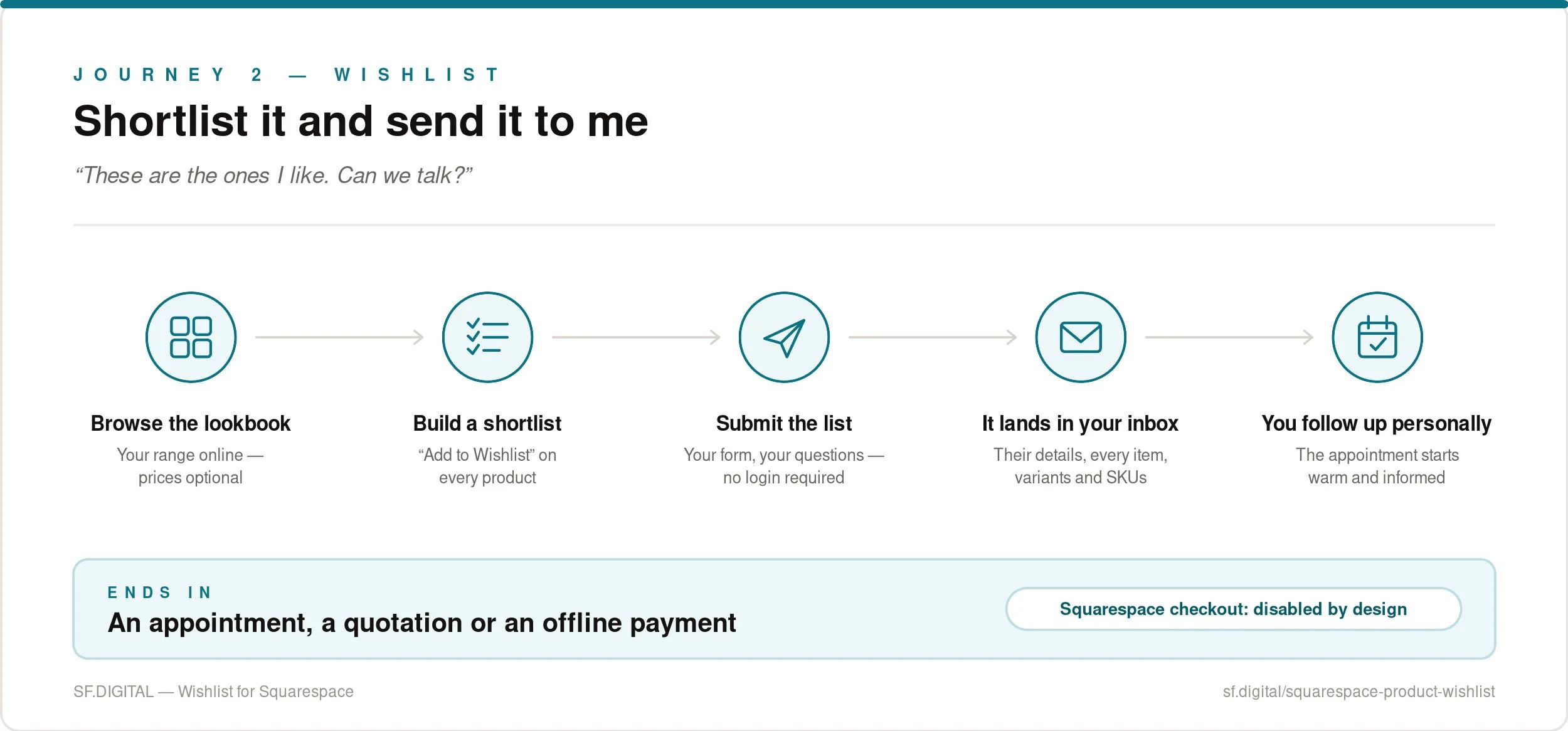
The customer's intent: "These are the ones I want. Can we talk?"
Who this suits: bridal boutiques, event and prop hire, wedding rental, furniture and interiors, galleries, trade suppliers, made-to-order specialists, schoolwear. Any business where the sale is completed by a person, not a payment gateway.
How it works: Our Wishlist plugin lets potential customers browse your products online, select their favourites, and submit a customised wishlist directly to you. Instead of an online checkout, the wishlist creates the opportunity for a personal follow-up.
Take a bridal boutique. Its success depends almost entirely on the immersive in-store experience for the bride and her party. A website cannot compete with the relaxed, pleasurable environment of the physical store, but it is an ideal way to share a lookbook showing the range of dresses and the stories behind the designers.
A bride identifies her favourite designers or gowns and submits a shortlist to the boutique before she meets her stylist. The store receives an email with the customer's details and the items on her list. The appointment starts warm, informed and personal.
The same journey applies to wedding and event rental stores, film prop houses, and any seller who provides estimates and quotations. When the wishlist arrives, you follow up by email and take payment later, on your terms.
The Wishlist plugin is designed for sites that do not take payments online. Once installed, the Squarespace cart becomes the wishlist and the checkout is disabled. That is a deliberate design decision, not an oversight. If you also want to sell online, use the Favourites plugin instead.
Product Enquiry journey: ask me about this one item
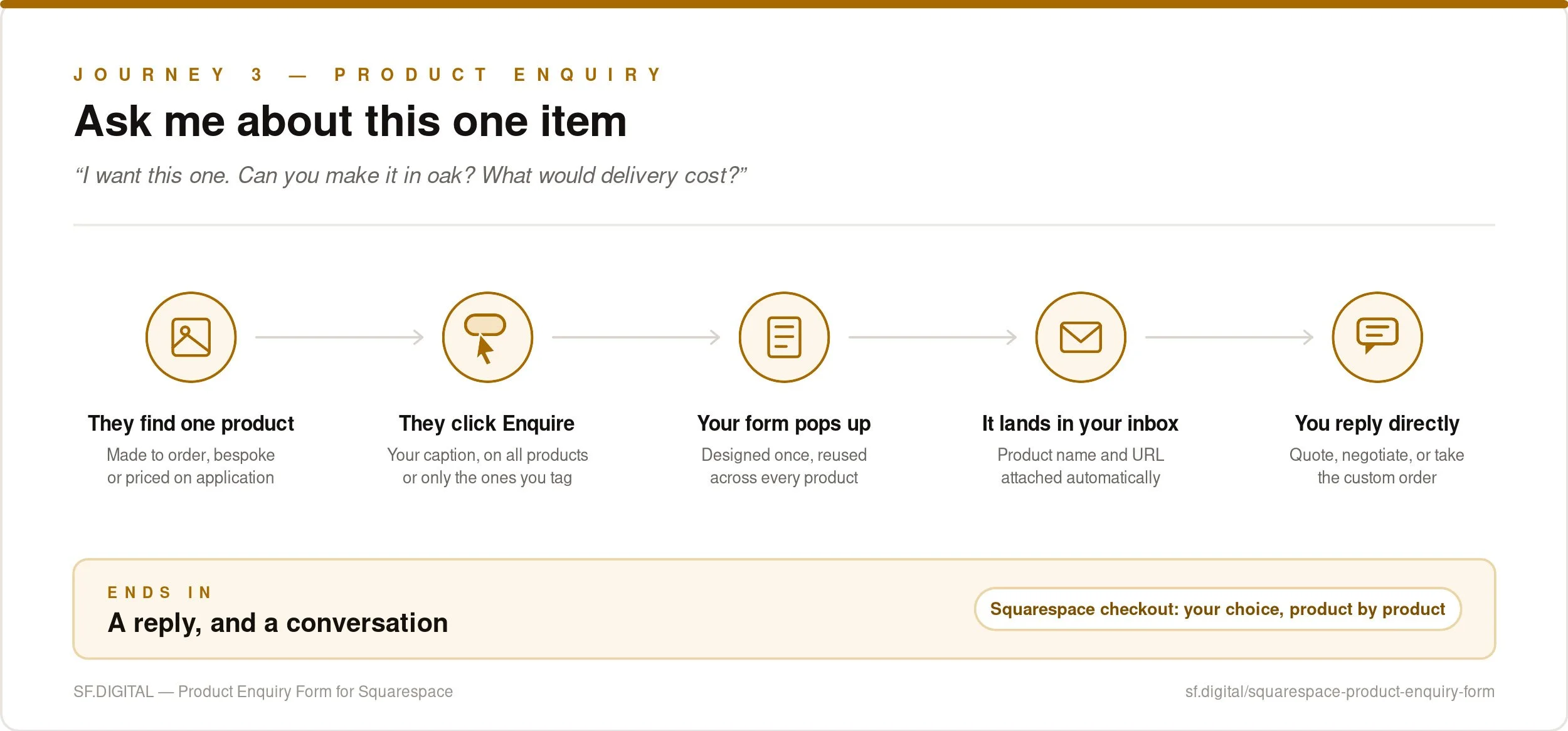
The customer's intent: "I want this one. What would it cost / can you make it in oak / how much is delivery?"
Who this suits: made-to-order producers, artists and makers, machinery and vehicle dealers, businesses with high or variable shipping costs, and anyone who negotiates prices or lists items as POA.
How it works: If you have ever tried to add an enquiry or special-order form to your Squarespace products, you will know how complex and visually unattractive it can become. Our Product Enquiry plugin adds an Enquiry button to each product, with a caption of your choice, opening a single custom form that you design once.
When the email arrives, you know exactly which product the customer asked about and you can reply directly. You choose whether the enquiry option appears on every product or only selected ones, and whether it appears on POA products.
You can also run it in a hybrid configuration: Enquire and Add to Cart together on some products, Enquire only on others, Add to Cart only on the rest. For a store where most items sell normally but a handful are bespoke, that flexibility is the whole solution.
The three journeys side by side
Work out where you want the customer to end up, and the choice makes itself.
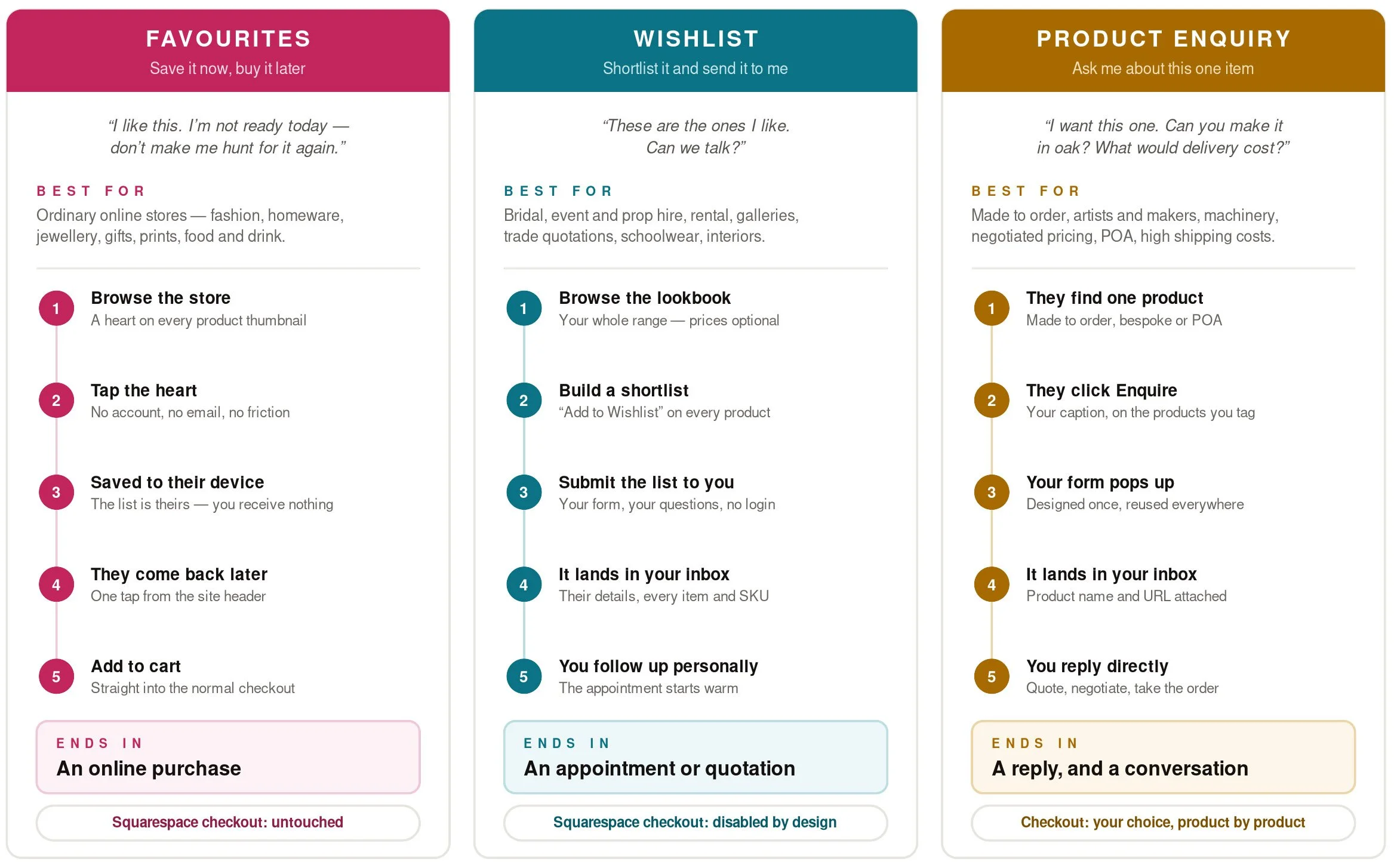
Three questions that will pick the plugin for you
1. Do you want the customer to pay online?
Yes → Favourites (or Product Enquiry in hybrid mode).
No → Wishlist.
2. Do you need to receive the list?
Yes → Wishlist. The submitted list is the lead.
No, the list is just for their convenience → Favourites.
3. Is this about many items or one item?
Many → Wishlist or Favourites.
One, with a question attached → Product Enquiry Form.
You’ll find detailed specifications on every product page so you can buy with confidence. However, if you unsure, we are happy to talk it through before you buy.
We’re a human business, not an AI bot. Use the chat feature (available at certain times of the day) or email us using our pre-sales support form.
Frequently asked questions
-
No. Squarespace has no native wishlist, favourites or save-for-later feature, on any plan. For wishlist functionality, you’ll need a plugin.
-
No. None of our plugins require the customer to have an account.
-
It depends which journey you have chosen. Favourites leaves the Squarespace checkout completely intact. The Wishlist plugin disables it deliberately, because it is built for businesses that do not sell online. The Product Enquiry Form lets you decide product by product.
-
Squarespace updates its platform continually, and occasionally a change will affect plugins and custom code. This is true for all plugins, not just ours. That is why we offer subscription versions that include automatic compatibility updates. One-time purchases are also available.
-
Our plugins are supported on every subscription plan except Personal and Basic.
The bottom line
Before you compare hearts, drawers and bottom bars, finish this sentence: when my customer stops browsing, I want them to ______.
Then buy the plugin that does that.
Buy online later → Favourites for Squarespace
Send me their shortlist → Wishlist for Squarespace
Ask me about one product → Product Enquiry Form for Squarespace
This guide was written by Paul, founder of SF.DIGITAL. He has been supporting the Squarespace community since 2007, is a Squarespace Circle Platinum Partner, a Squarespace Expert, and a Squarespace Community Leader.
