

Favourites for Squarespace
Improve user engagement. Let users save what they love!
Why do I need Favourites?
Our Favourites plugin is a game-changer for Squarespace stores, letting your visitors save their favorite products to their device! No account is needed—just click to save favorites, then return anytime to pick up right where they left off.
Simply put, “favouriting” is where you allow your users to save products to a list of favourites. It gives them quick access to a page on your Squarespace website where users can review the products they’ve shortlisted.
With the Favourites plugin you can:
Let potential customers mark their favorite products
Help users to narrow down their search by creating a product shortlist
Help users to find their favorites again easily when they return to your store. They’ll have one tap access from the site header.
Increase the chances of making a sale.
How does the favourites plugin work?
Store Page
The Favourites plugin adds a heart icon to every product thumbnail on every Store page (otherwise known as a Product List Page or PLP). This is a clear call-to-action (CTA) that is designed to encourage users to use the feature straight away.
Users can favourite many items quickly without reading the product details and without registering for an account. This is important because users are often reluctant to use features if they think they’ll need to register for an account. We’ve avoided this high interaction cost by saving the user’s list directly to their device.

Product Details Page
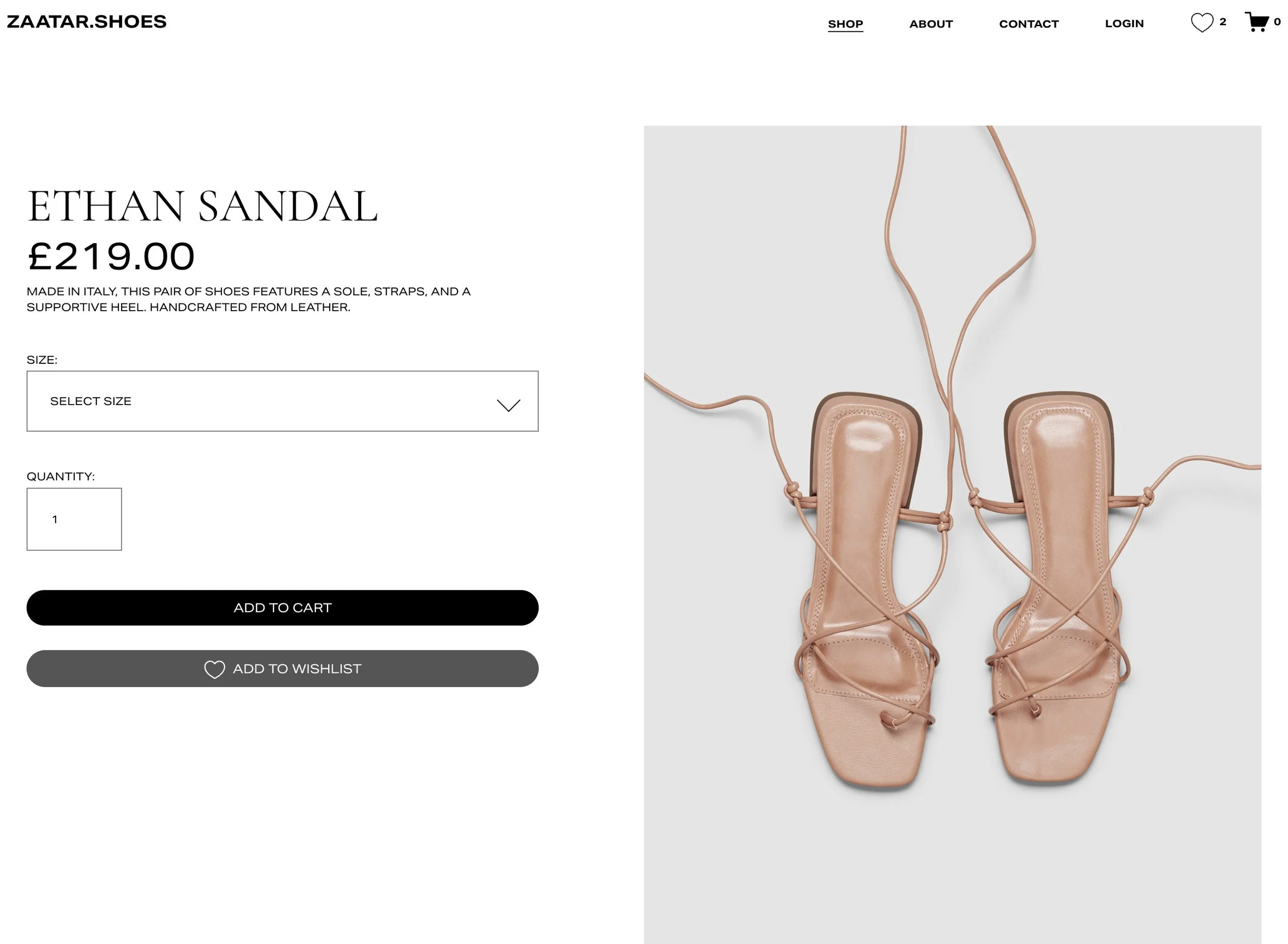
On Product pages (often called the Product Details Page or PDP) we add a favourites button right beside the “Add to Cart” button. UX testing shows this is the go-to location on this page! This button has a fully customisable caption and an icon that is filled when the product has been marked as a favourite. The screenshot below shows the caption “Add to wishlist” but you may prefer a caption like “Add to favorites” or even “Add to my list”.
Accessing the favourites list
A heart icon in the header (next to the cart icon) makes the favourites feature easy to discover and access. It clearly shows the user how many products they have added to their list.

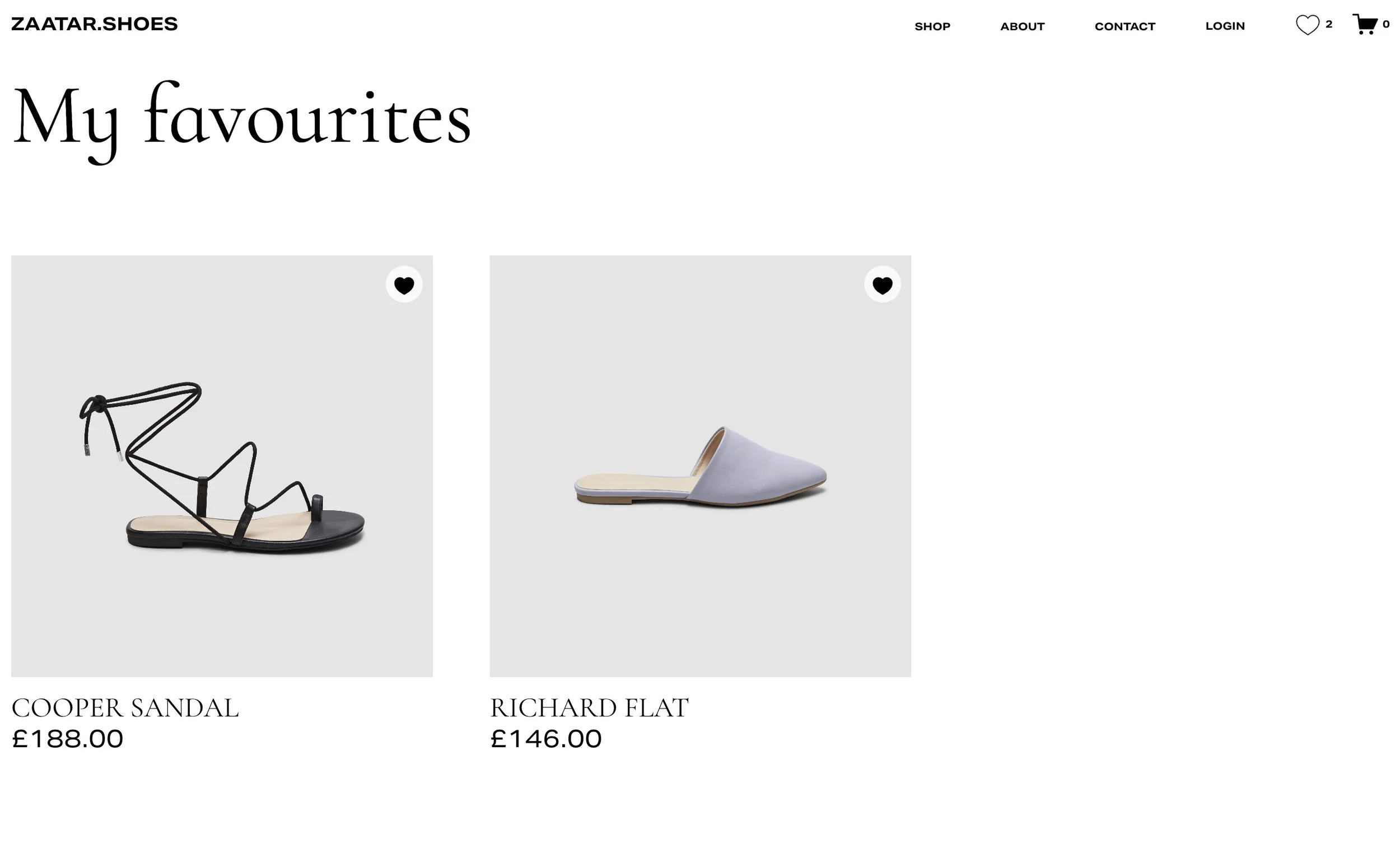
When clicked, the favourites page appears. You can customise this page to meet your own requirements. Add content. Change backgrounds, colours and fonts. Clicking one of the product thumbnails will take the user directly to the Product Detail Page where they can read more about the product and then add it directly to their cart.
Research shows that when users favorite a product they create a psychological connection with the site. If users feel that your site caters to their preferences, they are more likely to return and make a purchase. Also, studies show that when returning to a favourites list and seeing a product again, users often decide to purchase on impulse.
Purchase the Favourites plugin
Subscription
Always up to date. Updates handled for you.
- All future version upgrades included
- Compatibility updates included
- Priority email support
One-time purchase
Buy the current version. Upgrade when needed.
- Current version with bug fixes
- Compatibility updates available for purchase
- Standard email support
Please ensure the product will meet your needs before ordering. Full details are listed here.
![Favourites Plugin [Subscription]](https://images.squarespace-cdn.com/content/v1/535522c9e4b0ecf5755f4156/205a1ff0-a4c8-4c56-8c54-0382b41232b5/favourites-extension-heart-1000.png)
Features

Customisable
Completely customise the favourites page, the labels and the captions.

Clear call to action
The heart icon encourages users to use the feature straight away

7.1 Compatible
Use with all the Squarespace 7.1 templates available from Squarespace

Increase user engagement
Cater to your users’ needs so they are more likely to purchase

Fully supported
Full online support to get you started. Extended support subscriptions available.

Quality code
Exclusively made for Squarespace by us.
Installation Steps
Reviews
There are no reviews yet.
Examples
There are no site examples yet.
Our Squarespace extension was installed on the websites shown above. The inclusion of these examples does not imply a recommendation, nor does it indicate that we were involved in the design of these sites. Content can change without notice, so it may be possible that the extension has been removed or disabled from any of these sites before we have had the opportunity to remove a link. The screenshots and links have been published in good faith and for general information purpose only. These websites may be copyrighted and/or trademarked by the businesses they reference. Designers of these sites may have customised the product after purchase.
Specification and limitations
We believe in honesty and transparency so we clearly list the full product specification and limitations of each product. This isn’t “small print” or “fine print”. This is important information that you should read carefully to ensure the product will meet your needs. If you have any questions, we’re here to help.
All our plugins are digital products and, unlike physical products, cannot be returned. Orders cannot be canceled/refunded once supplied, unless the software can be proven to be faulty. Faulty digital products will be repaired or replaced. Full details can be found in section 2.3 of our Terms and Conditions.
The Favourites plugin is fully compatible with the Squarespace Cart and Checkout. Users can mark products as favourites and easily add them to their cart at a later date.
The plugin is compatible with physical, service and download products. Subscription and digital products (such as memberships and courses) cannot be added to the list.
Product favourites are stored on the user’s device. They do not need to register or login to use the tool, making the user interaction cost very low. If a user views your site from their mobile phone’s browser, they can return to the site at any time, using the same device/browser, to view their list of favourite products. If they view your site from another device, they will be considered a different user and won’t be able to access the list saved on another device.
When a user marks a product as a favourite, the “core” product is added to their favourite list. If a product has variants, they do not need to select any of them when favouriting it. For example, if a customer adds a shirt to their list, and that shirt is available in three sizes and two colours, the shirt will added to their list without any sizes or colours. When they are ready to order the product, they can tap the product in their favourites list to return them to the Product Details Page (PDP) where they can select a size and colour and add the product to their cart.
The favourites list is displayed on a page that is similar to the Store page (otherwise known as the Product List Page or PLP). They’ll see a product thumbnail, product title and product price.
The ‘Add to Favourites’ option will not appear in Quick View windows.
This plugin is compatible with all websites built with original Squarespace templates on their latest platform, known as Squarespace 7.1, including those using Fluid Engine Squarespace’s newest editing experience. It is not compatible with older websites that were built with version 7.0. To check which version of Squarespace you are using, go to Website and look for the Design option. If the Design option is unavailable then you are using the latest version of Squarespace and this product is compatible. If you do see the Design option, you're using an older version 7.0 template and this product is not compatible. Note that Squarespace offer a free Squarespace Update Tool to help you upgrade your website from version 7.0 to version 7.1.
Your Squarespace website must be on a Business, Commerce, Core, Plus or Advanced billing plan. The plugin cannot be installed on a Personal or Basic plan. If you're on a Personal or Basic plan, you can upgrade your website subscription at any time. For more information on Squarespace Billing Plans, see Choosing the right Squarespace plan.
This plugin cannot coexist with our Wishlist or Product Enquiry Form plugins on the same site. Only one of these products can be installed on a single site. If you are unsure which one is suitable, please contact us.
Products do not need to be “in stock” to be added to favourites.
Your product inventory/stock levels are not affected when a customer marks a product as a favourite.
The favourites list is available to the user on their own device. It is not shared with the site owner.
When you purchase the plugin, you get a single copy of the software for use on the single website with the domain specified on the order form. To protect our rights, the plugin is not transferable between websites and/or domains. It will stop working if the built-in Squarespace domain name or the primary domain name does not match the details supplied on the order form.
Squarespace make frequent changes to their Software and their Services. These changes are outside of our control, and we cannot guarantee that our plugins will be compatible with future changes. Please note that this is true for all Squarespace plugins, extensions and code snippets; it is not limited to our Software but we want you to know this because we believe in honesty and transparency. We therefore highly recommend the subscription version of our plugin, as this includes ongoing compatibility updates, ensuring the product remains fully supported throughout its lifetime. Email support is available whilst your subscription is active. You can cancel the subscription at any time from your account panel, but doing so will cancel all our support obligations for the Software.
As specified in our Terms and Conditions, we cannot guarantee that the Software will be compatible with third party code, plugins, customisations or integrations installed on the Squarespace website. In particular, this product is not compatible with the Weglot Visual Editor or “cart drawer” plugins.
Our products are compatible with all the current web browsers that support modern web standards, including Google Chrome, Mozilla Firefox, Apple Safari and Microsoft Edge. Our products are not designed to be compatible with older browsers such as Internet Explorer, which Microsoft retired on 15 June 2022.
Frequently Asked Questions
Is my Squarespace template supported?
This plugin can be installed on Squarespace 7.1 websites, where the template was supplied by Squarespace. Third party templates may use custom code and may not be compatible. Squarespace 7.1 is the newest Squarespace platform, launched in January 2020.
Will you produce a version for other templates?
No. If you have an older Squarespace website that was built on version 7.0 you will need to update your site to version 7.1 before you can use this plugin.
How do I install the plugin?
During the Beta period, we’ll be installing the plugin. When this is over, customers will be able to install it themselves. Full instructions are provided when you purchase this plugin. Installation requires you to know how to use basic Squarespace features like how to add a new page, add/edit text, add a Code Block and how to to copy and paste code into your website. If you are unsure what to do, or you’d just prefer professional installation, we can install it for you.
When will I receive the plugin?
If you choose ‘standard delivery’, we normally supply the plugin by email within three business days of your order. To receive it sooner, please choose ‘express delivery’ and we’ll deliver it the same working day (learn more).
Is my Squarespace plan supported?
The plugin can be installed on all sites that support custom code. This includes the Business, Commerce Basic and Commerce Advanced plans, as well as some legacy plans. The plugin is unsuitable for the Personal plan because Squarespace prevent code being used on these lower-cost plans. If you are unsure which plan you are on, check the Billing section of your website. To do this, click Settings, then click Billing, and finally click Subscriptions.
Why does it not ship immediately?
This is to allow us to carry out some pre-delivery order checks and to customise the product for your site. For example, we ensure your domain names are correct and we try to confirm your template is compatible. This is an important step because our plugins are digital products and cannot be returned for a refund.
How does the plugin work?
This plugin allows customers to create a shopping list of products they’d like to buy in the future, by marking their favourites. An ‘Add to Favourites’ button will appear below the ‘Add to Cart’ button on Product Detail Pages and a heart icon will appear on Product List Pages. A heart icon will appear in the site header beside the cart icon, allowing customers to reach their list of favourites.
When a product is favourited, what happens?
When a product is marked as a favourite, the product details (title, image, price) are stored on the user’s device. The user can view the list of favourite products by clicking on the heart icon in the header.
Can I rename the Add to Favourites button?
Yes! You can change the caption on the ‘Add to Favourites’ button. For example, you may want to call it ‘Add to Wishlist’.
Can I try the plugin?
Yes! Our demo site will be available soon.
Can I choose a different language?
The form will use the language that you selected for your site. Additionally all custom elements, including labels and buttons, can be translated. For example, you can change the buttons to ‘Agregar a favoritos’.
Can I change the content on the Favourites page?
Yes. You design this page yourself, adding any other blocks above and below the list of favourites.
Can I customise the colours?
You can change styles and colours using the Site Styles panel and Custom CSS. However, we do not provide support or guidance for this.
Does the plugin work on mobile?
Yes, the plugin uses Squarespace features and works well on touch devices like mobiles and tablets.