

Squarespace Wishlist Plugin
The original Squarespace Wishlist, since 2018.
Turn your Squarespace store into an enquiry-based catalogue. Let customers build a wishlist of products and submit it directly to your business for a quotation, rental enquiry or personal consultation, without online checkout.
Developed and supported by a UK company, led by a recognised Squarespace Circle Community Leader.
Why choose the original SF.DIGITAL Wishlist?
Built by a Squarespace specialist. Trusted by businesses worldwide.
SF.DIGITAL has been developing original Squarespace plugins since 2018, helping businesses extend the capabilities of Squarespace beyond its built-in features.
Unlike AI-generated code snippets, our Wishlist is a purpose-built solution, developed through years of real-world use and ongoing refinement.
Our founder is one of a small group of recognised Squarespace Community Leaders, a Squarespace Expert who has contributed technical expertise, platform feedback and practical solutions to the wider Squarespace community since 2009.
We're an established UK-registered company, providing real human support.
Case Study - a Bridal Boutique
Imagine the Lily & Lace bridal boutique. Success is usually dependent on the immersive in-store experience for the bride and her party. A website cannot compete with the relaxed and pleasurable environment of the physical store, but it can provide an ideal way to share a lookbook that showcases the range of dresses available and the stories behind the exclusive designers.
A potential customer can identify their favourite designers or dresses and submit a wishlist of their favourites to the boutique, before they meet their stylist. The store receives an email containing the customer’s details and the list of the items they added.
This Wishlist plugin is also ideal for wedding rental stores, film prop stores and for sellers who want to provide customers with estimates and quotations. When you receive the wishlist, you can follow-up by email and take payment later.
Real businesses. Real Squarespace websites.
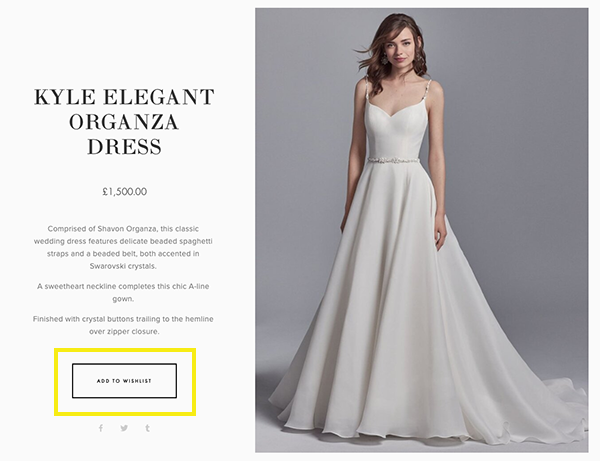
Bridal boutiques
Boutique owners use our Wishlist to let customers shortlist wedding dresses before contacting the boutique or arranging a fitting. The Wishlist provides an ideal way to share a lookbook that showcases the range of dresses available and the stories behind the exclusive designers.
Event companies
Event companies use our Wishlist so potential customers can assemble a list of products and then submit an enquiry for a quotation. The Wishlist plugin transforms the Squarespace shopping cart into an enquiry system, allowing customers to build a list of products and send it directly to your business, complete with their contact details and any additional information you've requested.

Trade and B2B suppliers
Wholesalers and business-to-business companies use our Wishlist to receive orders from their customers, bypassing the Squarespace checkout and avoiding online payments.
Features

Customisable
Customise the form, the button captions and the labels.

Custom ‘cart’ icon
Choose the traditional cart icon or
our custom heart icon.

Receive product details
The form will automatically include details of the products that were added.

7.1 Compatible
Use with all Squarespace 7.1 templates.

Form triggers
Forms connect to Squarespace storage options. Compatible with Zapier™.

Fully supported
Full online support to get you started. Priority support and free upgrades for subscribers.

Increase user engagement
Let potential customers engage online before you meet in person.

Know your customer
Get to know your customer by gathering data on their preferences.

Quality code
Exclusively made by us, for Squarespace.
Purchase the Wishlist
Subscription
Always up to date. Updates handled for you.
- All future version upgrades included
- Compatibility updates included
- Priority email support
One-time purchase
Buy the current version. Upgrade when needed.
- Current version with bug fixes
- Compatibility updates available for purchase
- Standard email support
Please ensure the product will meet your needs before ordering. Full details are listed here.
![Wishlist Plugin [Subscription]](https://images.squarespace-cdn.com/content/v1/535522c9e4b0ecf5755f4156/5756f34f-cdb6-4e4a-a551-865c7379e37b/wishlist-1000-subs.png)
The Wishlist plugin allows visitors to browse your products and submit their list directly to you - instead of paying online. It’s ideal for stores that take enquiries, quotes, approvals, or offline payments rather than online checkout.
With this subscription, your Wishlist plugin is kept up to date automatically. When Squarespace makes platform changes that affect the Wishlist, we apply the necessary compatibility updates for you, so you don’t need to worry about upgrades or version changes.
Administrator access to your website is required to enable ongoing updates.
Important: The Wishlist plugin is designed for websites that do not take payments online. When installed, the Squarespace checkout is disabled and cannot be used for purchases or payments.
Please ensure you have provided us with administrator access to your website to allow us to provide the updates. For more details see Providing us with access to your site.

This is the single payment version.
It includes:
The plugin as-is at time of purchase
Bug fixes and patches for your purchased version
It does not include:
Future version upgrades
Compatibility updates if Squarespace platform changes affect your version
Installation steps
What if I need help?
The Wishlist plugin is easy to install. We supply a step-by-step installation guide to allow you to install it yourself in less than 30 minutes (depending on your level of experience with Squarespace).
We provide full online support to get you started; if you need any help, please get in touch. If it's within our chat support hours you can reach out via the link below (bottom right) or you can use our contact forms to request pre-sales assistance or post-purchase support.
More than 98% of our customers install the Wishlist plugin by themselves, without any help from us. However, we do offer a concierge installation service (at additional cost) for customers who prefer professional installation. If you’d like the reassurance of ongoing support for the lifetime of your website, please purchase the subscription version of our plugin. This guarantees to protect you from unexpected costs.
Reviews
Examples


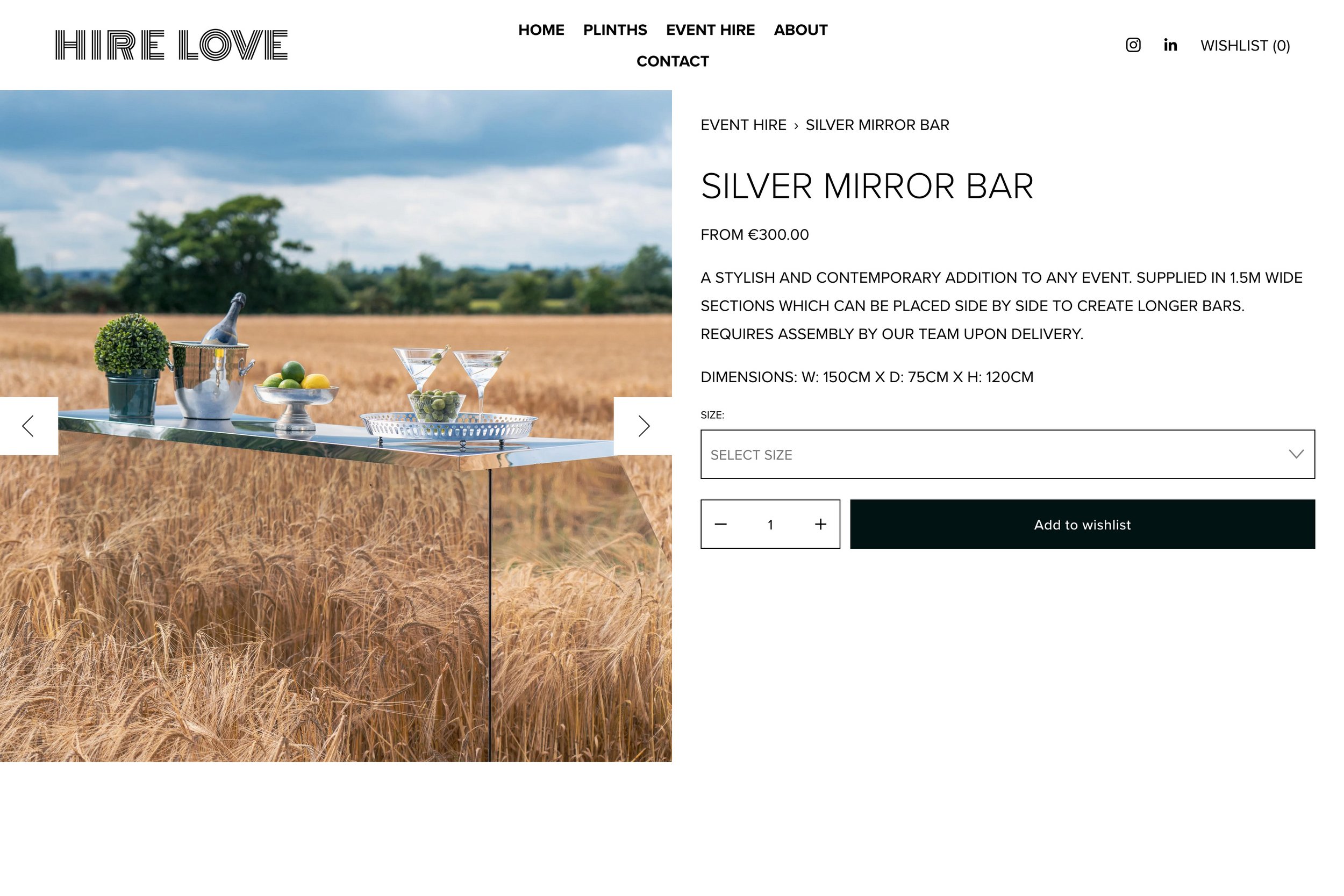



Our Squarespace plugin was installed on the websites shown above at the time of publication. The inclusion of these examples does not imply a recommendation, nor does it indicate that we were involved in the design of these sites. Content can change without notice, so it may be possible that the plugin has been removed or disabled from any of these sites before we have had the opportunity to remove a link. The screenshots and links have been published in good faith and for general information purpose only. These websites may be copyrighted and/or trademarked by the businesses they reference. Designers of these sites may have edited their sites or customised the product after purchase.
Specification
We believe in honesty and transparency so we clearly list the full product specification and limitations of each product. This isn’t “small print” or “fine print”. This is important information that you should read carefully to ensure the product will meet your needs. If you have any questions, we’re here to help.
All our plugins are digital products and, unlike physical products, cannot be returned. Orders cannot be canceled/refunded once supplied, unless the software can be proven to be faulty. Faulty digital products will be repaired or replaced. Full details can be found in section 2.3 of our Terms and Conditions.
The Wishlist plugin is designed for websites that do not take payments online (sales or donations). When installed, the Squarespace ‘cart’ becomes the ‘wishlist’ and the website’s checkout cannot be used for purchases. If you need to take payments online, please look at our Favourites plugin.
You design the Wishlist form using the Squarespace Form Editor. You decide which fields to use and how to style the form.
All labels and captions can be customised to meet your needs. For example, buttons say “Add to Wishlist” by default but you can change them to “Add to List”, “Add to Cart” or any wording, or language, of your choice.
The Wishlist settings are site-wide. You cannot have different settings for individual store pages.
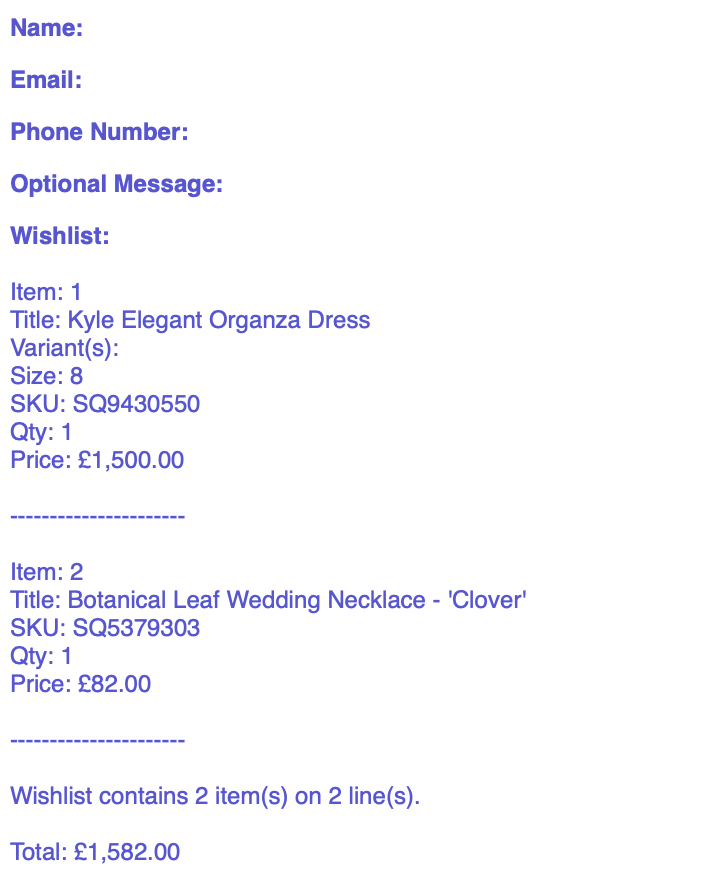
We’ve added support for Product Forms 🥳. We’re currently testing this Beta feature on Wishlists. On previous versions, the Wishlist did not include information from Product Forms (now known as ‘Add to Cart Forms’). When the Wishlist submission is received, it will include product titles, variant information (sizes, colours and so on), product SKUs, prices (if required) and quantities.
When your customers view the Wishlist on your website they will see the same visual, cart-style layout used by Squarespace, including product images. When the you receive the wishlist submission (usually by email), the list of products will arrive as a text-only list format. This format cannot include images or table formatting (due to limitations within Squarespace).
The ‘Add to Wishlist’ option will not appear in Quick View windows. We recommend that you disable Quick View when using this plugin.
This product is compatible with all websites built with the current version, Squarespace 7.1. Older templates are no longer supported. To check which version of Squarespace you are using, go to Website and look for the Design option. If the Design option is unavailable then you are using the latest version of Squarespace! If you do see the Design option, you're using an older version 7.0 template and you would need to use the free Squarespace Update Tool to update to version 7.1.
Squarespace does not allow plugins on a Personal or Basic plan. If you're on a Personal or Basic plan, you must upgrade to use the Wishlist. For more information on Squarespace Billing Plans, see Choosing the right Squarespace plan.
This Wishlist plugin cannot coexist with our Product Enquiry Form on the same site. Only one of these two products can be installed on a single site. If you are unsure which one is suitable, please contact us.
As the Wishlist is based on the Squarespace cart, it is subject to the same limitations as the cart. For example:
the Squarespace cart has an item limit of 500 items
products must be “in stock” otherwise they cannot be added to the cart
Subscription products cannot be added to the cart.
A customer's wishlist is not routinely cleared after it has been submitted. This is to allow customers to submit their list and refer back to it again later. Even if they leave the site and return later, the items will remain on the wishlist, unless you remove a product from sale or set the stock level to zero. If visitors want to remove items from their wishlist, they can do this on a line-by-line basis using the 'X' icon beside each one. November 2025: We’ve added Beta support for clearing the Wishlist/Cart after the Wishlist form has been submitted 🥳. Note that Beta features are not officially supported yet, but we welcome your feedback.
Wishlist submissions do not affect inventory levels. Your product inventory/stock levels will not decrease when items are added to the wishlist, or when the wishlist is submitted.
The wishlist is sent to the seller using a Squarespace Form. By default, form submissions are sent to the single email address that you configure when you create the form. This is typically the website administrator’s email address. Squarespace Forms are very flexible and can be connected to a wide range of storage options and workflows, although these are Squarespace features, not wishlist features, and are therefore supported by Squarespace, not by us.
When you purchase the plugin, you get a single copy of the software for use on the single website with the domain specified on the order form. To protect our rights, the plugin is not transferable between websites and/or domains. It will stop working if the built-in Squarespace domain name or the primary domain name does not match the details supplied on the order form.
We offer this plugin as either a subscription (recommended) or as a one-time purchase.
The subscription version includes all version upgrades and compatibility updates whenever Squarespace changes their platform, as well as priority email support. This ensures that the plugin remains fully supported throughout its lifetime. Priority email support is available whilst your subscription is active. You can cancel the subscription at any time from your account panel.
Customers who purchase the one-time purchase version will receive the software “as-is” at time of purchase, including bug fixes and patches for your purchased version. It doesn’t include version upgrades or compatibility updates if your version breaks due to Squarespace updates. Squarespace make frequent changes to their Software and their Services. These changes are outside of our control, and we cannot guarantee that plugins purchased without a subscription will be compatible with future changes.
As specified in our Terms and Conditions, we cannot guarantee that the Software will be compatible with third party code, plugins, customisations or integrations installed on the Squarespace website. In particular, this product is not compatible with the Weglot Visual Editor or “cart drawer” plugins.
Our products are compatible with all current web browsers that support modern web standards, including Google Chrome, Mozilla Firefox, Apple Safari and Microsoft Edge.
Frequently Asked Questions
Is my Squarespace template supported?
This plugin can be installed on every Squarespace site built on the current version of Squarespace (known as v7.1). If you have an older website that was built on a previous version of Squarespace you must upgrade to 7.1 using their free update tool, before installing this plugin.
Will you produce a version for other templates?
We currently support all the available Squarespace 7.1 templates. As Squarespace are encouraging all users to migrate to version 7.1, we will not be supporting older version 7.0 templates. To use the plugin, please upgrade to Squarespace 7.1 at no cost using the Squarespace free update tool.
How do I install the plugin?
Full instructions are provided when you purchase this plugin. Installation requires you to know how to create a Squarespace form (using a Form Block) and how to copy and paste code into your website’s code areas. If you are unsure what to do, or you’d just prefer professional installation, we can install it for you (there’s a small charge).
When will I receive the plugin?
If you choose ‘standard fulfilment’, we normally supply the plugin by email within three business days of your order. To receive it sooner, please choose ‘express delivery’ and we’ll deliver it the same business day (learn more). You’ll find more details on our fulfilment page.
Is my Squarespace plan supported?
This plugin is supported on all Squarespace website plans except Personal or Basic. If you are unsure which plan you are on, check the Billing section of your website. To do this, click Settings, then click Billing, and finally Subscriptions.
Why does it not ship immediately?
Digital products cannot be returned for a refund so we carry out some pre-fulfilment compatibility checks before we fulfil your order. For example, we ensure your domain names are correct and we try to confirm your template is compatible.
How does the plugin work?
This product is designed for websites that want to show their products online but do not want to sell them using ecommerce. When the plugin has been installed, the Wishlist replaces the cart, and hides the checkout. Once installed, it is not possible to purchase items using the checkout. The ‘Add to Cart’ buttons are replaced with ‘Add to Wishlist’ buttons, but you can change the wording to suit your needs.
When a Wishlist is submitted, what happens?
When a wishlist is submitted, the product information is sent, together with any information the customer has added to the form. This will typically include the customer’s contact information. The wishlist content includes the following for each product that was added:
Product Name
Variant Name (if a product has a variant). Note that information captured in custom product forms is not included.
Product Form data (beta feature)
The product SKU
Quantity selected (if required)
Price (if required)
You can connect the wishlist form to email or the online automation tool Zapier. This lets you create Zaps, a type of automated workflow, to connect your form to over 1,000 apps. Zapier has integrations with Slack, Trello, ConvertKit, Salesforce and more, helping you save time by connecting Squarespace to useful tools and automating processes.
Here is an example of a Wishlist submission:
Can I rename the Add to Wishlist button?
Yes! You can change most of the phrases associated with the plugin. For example, you can choose your own wording for the:
‘Add to Wishlist’ button
‘Send Wishlist’ button
title of the wishlist page (formally the cart)
title and content of the email
Can I try the product?
Yes! Please you can try the Wishlist from a website user’s perspective by using the Lily & Lace demonstration site above.
Can I choose a different language?
The form will use the language that you selected for your site. The template-family supports English, French, German, Italian, Portuguese or Spanish. Additionally all custom wishlist elements, including labels and buttons, can be translated. For example, buttons are called ‘Add to Wishlist’ by default, but you can change it to ‘Add to Favourites’ or ‘Agregar a favoritos’.
Can I change the questions on the Wishlist Form?
Yes. You design the form yourself. You have complete control over the design of the form.
Can I customise the colours?
Yes, you can change the colours of the form using the Squarespace style settings.
Does the product work on mobile?
Yes, the plugin uses Squarespace features and works well on touch devices like mobiles and tablets.
Why is the wishlist not cleared after it is submitted?
By default, the wishlist is not cleared when it is submitted because the wishlist “belongs” to the customer and they may want to refer back to it. It’s a permanent record of the items that they added. Even if they leave the site and return later, the items will remain on the wishlist unless you remove a product from sale or set the stock level to zero. If visitors want to remove items from the wishlist, they can do this on a line-by-line basis using the 'X' icon beside each one.
We have recently added Beta support for clearing the Wishlist/Cart after the Wishlist form has been submitted. Beta features are not officially supported yet, but we welcome your feedback.
What happens when Squarespace update the platform?
Squarespace updates the platform daily and these changes rarely affect our plugins or your custom code. On the rare occasion Squarespace rolls out a major change, some plugins or custom code may need an update. If you will rely on the Wishlist plugin we recommend purchasing it with a subscription. It includes all upgrades, installed automatically by us. If you prefer pay-as-you-go, you can purchase the plugin with a one-time fee and, if an upgrade becomes necessary later, you can purchase a discounted upgrade.