

Product Enquiry plugin for Squarespace
Replace the 'Add to Cart' button with an ‘Enquiry’ or ‘Custom Order’ button
Why do I need a Product Enquiry plugin?
If you’ve ever tried to add an enquiry, inquiry or special order form to your Squarespace products you’ll know how complex and visually unattractive it can be. We have a solution that is ideal for products that are made to order, products that involve high shipping costs, or where prices need to be negotiated.
Our plugin adds an Enquiry button to each product, with a caption of your choice, allowing customers to contact you via a single, custom form (that you design once!). When you receive the email, you’ll know which product they enquired about and you can reply directly to them. You can choose to add the enquiry option to all your products, or only selected products. You can also choose to add it to POA products (where you’ve set a 0.00 price). The choice is up to you!

Customisable
Completely customise the form. Choose the fields that you want to include.

Build Once
Build the form once and apply it to multiple products of your choice.

Receive product details
The form includes the product name and the product URL automatically.

7.1 Compatible
Use with all Squarespace 7.1 templates

Form Triggers
Submitted forms will trigger Squarespace events. Fully compatible with Zapier™.

Fully supported
Full support available to get you started. Subscription plans available.

Increase User Engagement
Offer a clearly signposted, easy to use route for potential customers.

Popup Form
The enquiry button launches a pop-up form right there on the product page.

Quality Code
Exclusively made by us for Squarespace.
Purchase the Product Enquiry plugin
Make it easy for visitors to enquire about custom products
Subscription
Always up to date. Updates handled for you.
- All future version upgrades included
- Compatibility updates included
- Priority email support
One-time purchase
Buy the current version. Upgrade when needed.
- Current version with bug fixes
- Compatibility updates available for purchase
- Standard email support
Please read the product specification carefully before ordering.

Make it easy for visitors to enquire about custom products with this plugin.
Make it easy for visitors to enquire about custom products with this plugin.
Examples
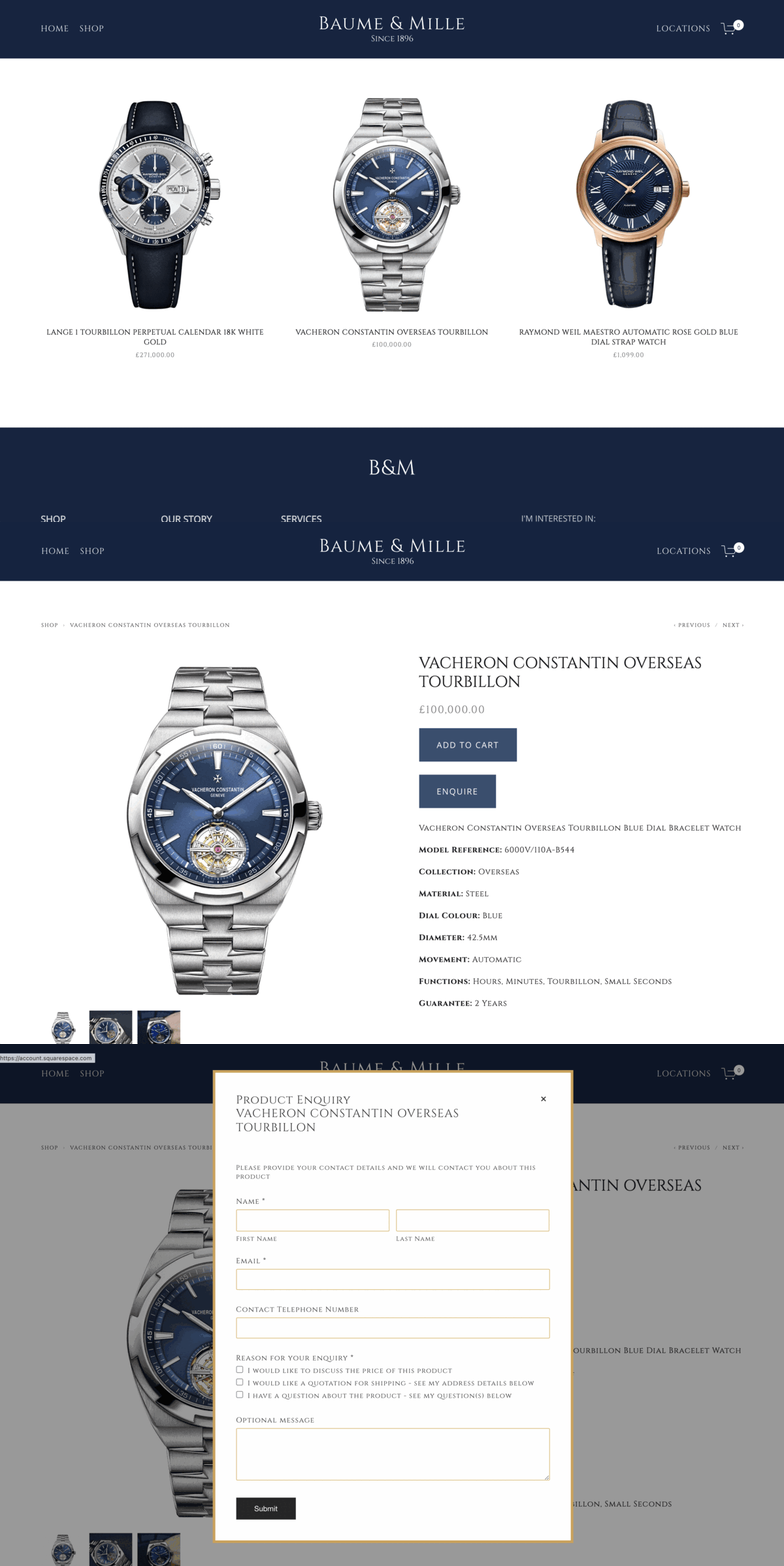


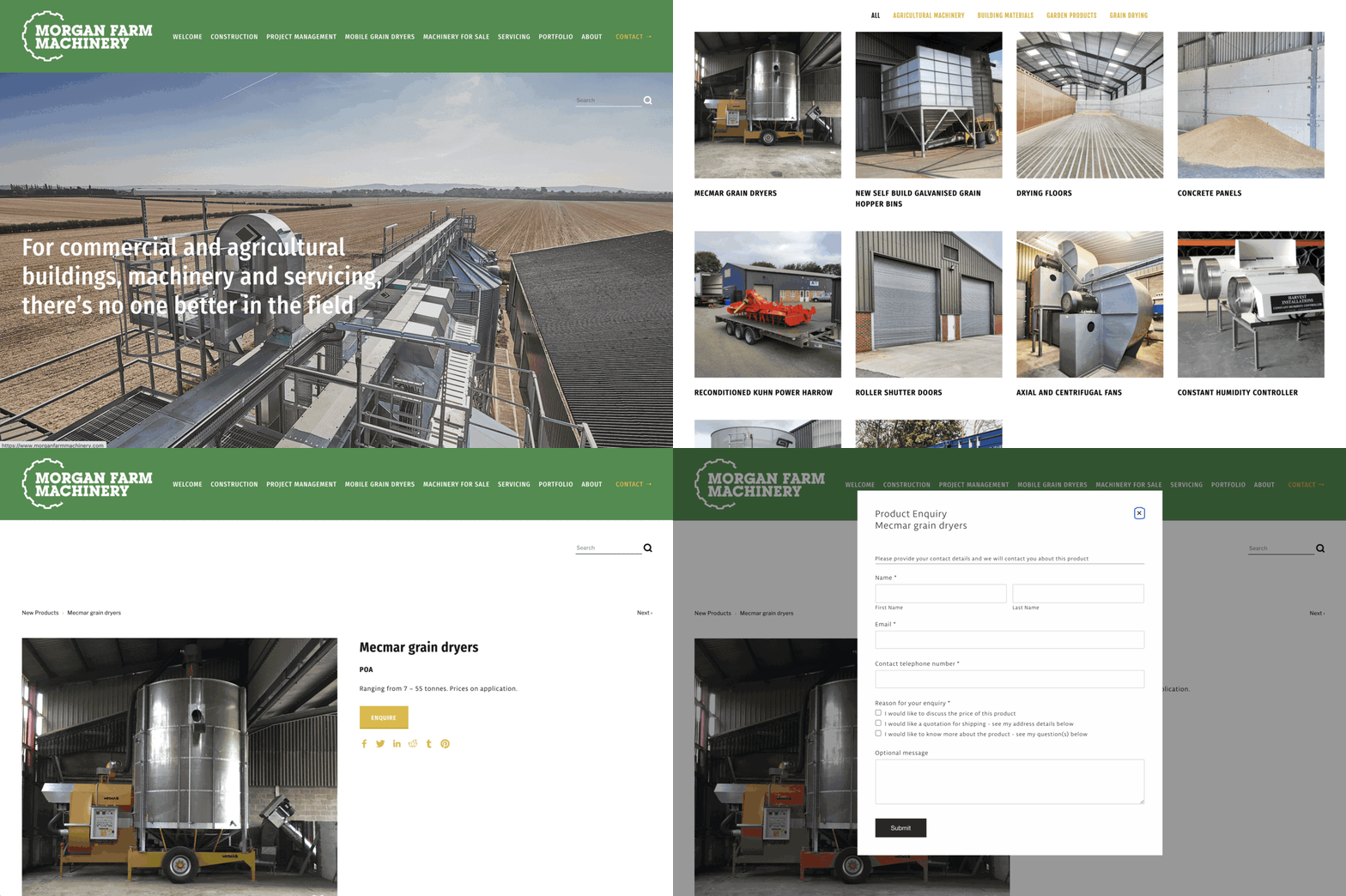

Our plugin is installed on the websites shown above. The inclusion of these examples does not imply a recommendation, nor does it indicate that we were involved in the design of these sites. Content can change without notice, so it may be possible that the extension has been removed or disabled from any of these sites before we have had the opportunity to remove a link. The screenshots and links have been published in good faith and for general information purpose only. These websites may be copyrighted and/or trademarked by the businesses they reference. Designers of these sites may have customised the product after purchase.
Specification and limitations
Our goal is to be completely honest and transparent, so we clearly list the full product specification and limitations of each product. This isn’t “small print” or “fine print”. This is important information that you should read carefully to ensure the product will meet your needs - before ordering. If you have any questions, we’re here to help.
All our plugins are digital products and, unlike physical goods, cannot be returned. Orders cannot be cancelled or refunded once supplied, unless the plugin is proven to be faulty. In the case of a fault, we will repair or replace the software. Full details are available in our Terms and Conditions.
This plugin is compatible with all Squarespace websites built using the latest platform, known as Squarespace 7.1, including those using Fluid Engine. Sites built on the older Squarespace 7.0 platform are not supported. To check your version of Squarespace, log on to your site and navigate to Website. Look for the Design option. If you do not find a Design option, you're using the latest version of Squarespace, and your site is compatible. If you do see the Design option, you're using an unsupported version and you will need to use the free Squarespace Update Tool to update to version 7.1.
This plugin cannot be installed on a “Basic” or “Personal” website billing plan. Your Squarespace site must be on a “Core” (or “Business”) billing plan or higher. You can upgrade your website plan at any time. For more information, see Choosing the right Squarespace plan.
You can configure product buttons to show only an Enquire/Inquire button, both an Enquire/Inquire and Add to Cart button, or only an Add to Cart button. This setting can be controlled on a per-product basis using product tags, or can be applied site-wide.
The plugin captures the product name and product URL. It does not capture quantity, variant information, or custom product form data, as the enquiry form has been designed to be launched before variant selection. If you need to capture this information, you may add additional fields to enquiry form.
The plugin uses a single enquiry form across all products. You will design this form during installation, including any custom fields you wish to add. Product-specific details (as listed in item 5) are included automatically. The plugin does not support creating separate forms for individual products.
The plugin does not affect Quick View windows. You should disable Quick View when using this plugin.
The plugin is not compatible with Squarespace’s Cart Buttons feature, which adds Add to Cart buttons under each product on Product List Pages (PLPs). We recommend disabling this feature if using enquiry-only products, otherwise Add to Cart buttons will appear for all products on those pages.
The plugin does not affect Product Blocks. The Enquire button appears only on Product Detail Pages, not Product Blocks.
This plugin cannot coexist with our Wishlist plugin on the same site. Only one of these two plugins can be installed on a single site. Please contact us if you are unsure which one is suitable.
We offer this plugin as either a subscription (recommended) or as a one-time purchase.
The subscription version includes all version upgrades and compatibility updates whenever Squarespace changes their platform, as well as priority email support. This ensures that the plugin remains fully supported throughout its lifetime. Priority email support is available whilst your subscription is active. You can cancel the subscription at any time from your account panel.
Customers who purchase the one-time purchase version will receive the software “as-is” at time of purchase, including bug fixes and patches for your purchased version. It doesn’t include version upgrades or compatibility updates if your version breaks due to Squarespace updates. Squarespace make frequent changes to their Software and their Services. These changes are outside of our control, and we cannot guarantee that plugins purchased without a subscription will be compatible with future changes.
Your purchase includes a single plugin for use on the website domain specified in your order. The plugin is not transferable to other websites or domains. It will stop working if the built-in Squarespace domain name or the primary domain name does not match the details supplied with the order. You do not need to have the primary domain connected at the time of purchase or installation. We only ask for this information so that the plugin will continue to work after the primary domain name has been added. If you are unsure about this, please contact us.
We cannot guarantee compatibility with third-party code, plugins, customisations, or integrations. This plugin is not compatible with the Weglot Visual Editor.
Squarespace frequently updates its platform. These changes are outside of our control, and we cannot guarantee future compatibility. This limitation applies to all plugins and code snippets, not just our products. See our Terms and Conditions for more information.
Our products are compatible with all the current web browsers that support modern web standards, including Google Chrome, Mozilla Firefox, Apple Safari and Microsoft Edge.
Installation Steps
What if I need help?
The Product Enquiry Form plugin is easy to install. We supply a step-by-step installation guide to allow you to install it yourself in less than 30 minutes.
We provide full online support for the first 30 days to get you started so if you need any help please get in touch.
At certain times of the day/week we offer support via our online chat service. At those times, you can reach out via a chat link below (bottom right) or you can use our contact forms at any time to request pre-sales assistance or post-purchase support.
More than 95% of our customers install the Product Enquiry Form plugin without any help from us, but we provide a concierge installation service (on request) for customers who prefer professional installation by us.
Extended support is also available. A subscription entitles you to full email support and no-cost updates to your plugin for the duration of your active subscription.
Frequently Asked Questions
Which version of the plugin does this FAQ refer to?
This FAQ answers questions relating to version 3.x of the Product Enquiry Form plugin (sold after June 2025).
Is my Squarespace template supported?
This plugin can be installed on Squarespace version 7.1. If you are unsure which version you are using, navigate to the bottom of your Pages panel (below the page names) and you’ll see Version 7.1 or Version 7.0.
If you see Version 7.1, you can use our plugin. If you are using Squarespace 7.0, you will need to upgrade to the latest Squarespace version to use this product. Squarespace offer a free Squarespace Update Tool to help you upgrade your website from version 7.0 to version 7.1.
Will you produce a version for other templates?
We don’t have plans to develop plugins for version 7.0 templates, as Squarespace is in the process of phasing them out. If you’d like to use one of our plugins and access to new features, we recommend using the free Squarespace Update Tool to upgrade your website from version 7.0 to version 7.1.
How do I install the plugin?
Full instructions are provided when you purchase this plugin. Installation requires you to know how to create a Squarespace form (using a Form Block) and how to copy and paste code into your website’s code areas. If you are unsure what to do, or you’d just prefer professional installation, our Squarespace expert can install it for you (additional charges apply).
When will I receive the plugin?
We normally supply the plugin by email within three business days. We’re based in Northern Ireland, so “business days” refers to our UK hours.
Why is the product not shipped immediately?
The plugin is customised for your website before it is emailed to you. This is an unfortunate but necessary step because we know from experience that not everyone respects the copyright in our products.
Is my Squarespace plan supported?
This product can be installed on all sites using any billing plan except Personal or Basic. If you are unsure which plan you are on, check the Billing section of your website. To do this, click Settings, then click Billing, and finally Subscriptions.
How does the plugin work?
When the code has been installed, you select which products should have the Enquire button.
You have three choices for each product:
Enquire and Add-to-Cart button
Enquire button only, instead of the Add-to-Cart button
Add-to-Cart button only. No Enquire button.
You can also choose for the Enquire button to appear on all products that are out of stock.
When a visitor clicks the Enquire button, they see the form you designed. When they submit the form, the details that they have entered are sent to you, together with the product name and a link to the product. These details ensure that you know which product they are enquiring about.
When an Enquiry Form is submitted, what happens?
You can connect the Enquiry form to email or the online automation tool Zapier. This lets you create Zaps, a type of automated workflow, to connect your form to over 1,000 apps.
Form submissions can trigger additional Zapier integrations like Slack, Trello, ConvertKit, Salesforce and more. This can help you save time by connecting Squarespace to useful tools and automating processes.
Can I try the plugin?
Yes! You can try it by using one of the example site(s) above.
Can I choose a different language?
The form will support the same language as your site template. Squarespace templates can usually support English, French, German, Italian, Portuguese or Spanish
Can I change the 'Enquiry' label on the button?
Yes. You choose how to label the ‘Enquire’ button.
Can I change the questions on the Enquiry Form?
Yes. You design the form yourself. You have complete control over the design of the form.
Can I customise the colours?
You can change the colours of the form using Custom CSS, but we do not provide support or guidance about how to do this.
Does the plugin work on mobile?
Yes, the plugin uses Squarespace features and works well on touch devices like mobiles and tablets.