

Squarespace 7.1 is a great platform for selling almost anything but products must be sold in whole numbers with a minimum quantity of ‘one’. This is fine for many situations, but what if you want to sell half a metre or half a yard of something?
Sell fabric by the half-metre
This is a familiar problem for anyone trying to sell fabric online and it’s a particular problem for anyone selling exclusive or luxury fabrics that are limited in supply, as these are often sold in smaller fractions, for example 25cm or 0.25 yards (1.25, 1.5, 1.75 and so on).
This guide describes a free workaround that I built for Squarespace 7.1 websites to allow fractions of fabric to be purchased. This example uses half-metre units but, as you’ll see in the code, you can adjust it to meet your needs. You can also enable it on a product by product basis by tagging products with a tag to indicate they are sold in fractions.
How does it work?
This workaround doesn’t change the way that Squarespace handles quantities because it isn’t possible to do this, so it makes visual changes that guide the customer through their purchase. The first step is to add some narrative to your product description to indicate that it is sold by the half-metre, so that quantity ‘2’ is actually one metre. The code then modifies the caption on the ‘Add to Cart’ button to show that “Quantity: 1” is actually half a metre of fabric.
Here’s an example:
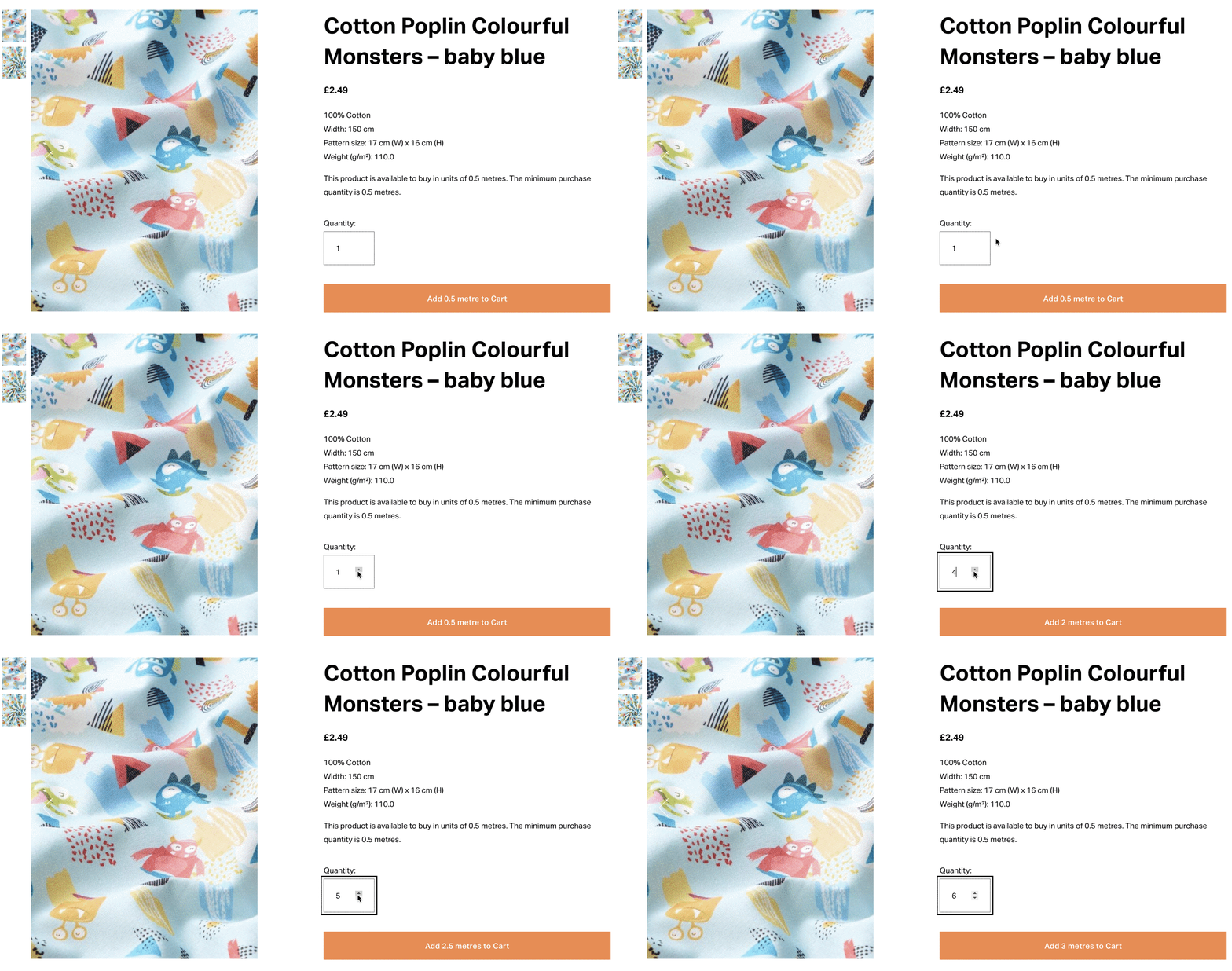
In this example, the button caption changes as the quantity is increased
In summary, this replaces the Add to Cart label with a label that shows the number of metres being purchased - where 'Qty:1' is '0.5 metres'. The comments (prefixed with //) can be removed as they are only there to help you understand what is going on.
How to install
Updated in July 2025
This guide was updated in July 2025 for compatibility with the Squarespace Store Page update known as the Products V2 Update. This update is being rolled out to all Squarespace sites by 30 August 2025. If your site has not yet been updated to V2, you must update it before this code will function.If you’d like this to affect all products on your Squarespace website, go to Code Injection and then scroll down to the panel labelled Footer.
Paste the following code into the Footer panel and save your changes:
<!-- Sell in fractional units on Squarespace Product Pages -------------------->
<!-- Copyright Soundfocus Digital Ltd [https://sf.digital] -------------------->
<!-- Use freely in your code injection. Do NOT re-publish.--------------------->
<!-- Updated in July 2025 for compatibility with Products V2 Update ----------->
<script>
  document.addEventListener("DOMContentLoaded", () => {
    // Look for an Add to Cart button on this page
    const sfCartBtnInner = document.querySelector('.product-detail .sqs-add-to-cart-button-inner');
    if (sfCartBtnInner) {
      // Set initial caption on button (0.5 metre to match Sqsp Qty of 1)
      sfCartBtnInner.innerText = "Add 0.5 metre to Cart";
      // Look for the Quantity input
      sfQtyValue = document.querySelector('.product-quantity-input');
      // If the quantity value changes...
      sfQtyValue.addEventListener('input', function (e) {
        // The value will be half the quantity
        var sfYards = this.value / 2;
        // Change the button caption (consider single and multiples)
        if (sfYards == 1) {
          sfCartBtnInner.innerText="Add " + sfYards + " metre to Cart";
        }
        else {
          sfCartBtnInner.innerText="Add " + sfYards + " metres to Cart";
        }
      });
    }
  });
</script>
<!-- End of fractional units script ------------------------------------------->
If you only sell some products in fractional units, you can add tags to those products and modify the code to only apply to those products. If you aren’t familiar with adding tags to products, please refer to the Squarespace support guide, Categories and tags.

For example, if you give your fabric products a “by half metre” tag (as shown above), you would use the following script instead. Note the addition of .tag-by-half-metre on the seventh line, to indicate that it should only apply to products with a “by half metre” tag:
<!-- Sell in fractional units on Squarespace Product Pages -------------------->
<!-- Copyright Soundfocus Digital Ltd [https://sf.digital] -------------------->
<!-- Use freely in your code injection. Do NOT re-publish.--------------------->
<!-- Updated in July 2025 for compatibility with Products V2 Update ----------->
<script>
  document.addEventListener("DOMContentLoaded", () => {
    // Look for an Add to Cart button on this page
    const sfCartBtnInner = document.querySelector('.product-detail.tag-by-half-metre .sqs-add-to-cart-button-inner');
    if (sfCartBtnInner) {
      // Set initial caption on button (0.5 metre to match Sqsp Qty of 1)
      sfCartBtnInner.innerText = "Add 0.5 metre to Cart";
      // Look for the Quantity input
      sfQtyValue = document.querySelector('.product-quantity-input');
      // If the quantity value changes...
      sfQtyValue.addEventListener('input', function (e) {
        // The value will be half the quantity
        var sfYards = this.value / 2;
        // Change the button caption (consider single and multiples)
        if (sfYards == 1) {
          sfCartBtnInner.innerText="Add " + sfYards + " metre to Cart";
        }
        else {
          sfCartBtnInner.innerText="Add " + sfYards + " metres to Cart";
        }
      });
    }
  });
</script>
<!-- End of fractional units script ------------------------------------------->
How to style it
If you are using the ‘Simple’ PDP layout, no further adjustment is required.
PDP Layouts
The Product Detail Page has several fixed layouts and a layout that is called 'Simple'. Despite being called 'Simple' this is the fully customisable layout of this page. The other options have fixed layouts and cannot be adjusted.However, if you are using one of the fixed layouts like Wrap or Full, you may find that the button varies in width as the quantity changes, causing it to 'jump around'. Adding a line of styling to Custom CSS to set a minimum width for the button will fix this:
/* Fix width of cart button */
.product-detail .sqs-add-to-cart-button {
  min-width: 196px;
}
I hope this helps you if you are looking for a workaround for purchasing fractional quantities on Squarespace.
Paul
