
TL;DR: It’s caused by a special feature on certain Squarespace 7.0 templates called Ajax Page Loading. You can disable this in Site Styles but it will slow down your site. Read on for more detailed information.
I've answered hundreds of questions where users ask why a particular piece of code isn't working on their Squarespace 7.0 site and so I wrote this guide to explain what’s happening and how you can fix it. Questions often refer to code that was found on one of the forums (such as the Squarespace Forum or Squarespace Circle) but they can also refer to scripts or ‘widgets’ that companies have produced to add features to a website.
So why is this happening? The answer is Ajax Page Loading.
Some Squarespace 7.0 templates (including 140+ templates in the Brine-family) have a great feature that Squarespace added called Ajax (Asynchronous JavaScript And XML) Page Loading. When a visitor lands on one of your website pages, their device will download the entire page from Squarespace servers, including the header(s) & navigation, the page body and the footer(s), including any code that has been added. When the same user navigates to a second or subsequent page on your website, you’d expect their device to download the content of the second page, including the header(s) and navigation, the body and the footer(s). However on templates with the ‘Ajax Page Loading’ feature, when the visitor navigates to another page of your site to view a product or move between blog posts their device will only download the content that has changed - the part of the page in between the header and the footer. The existing headers, footers and navigation remain in place, because they were downloaded when the visitor arrived on the site so there’s’ no need to download them again. This has a huge positive impact on users, especially those with slower connections because every page will load faster and there will be no ‘page jumping’ which makes for a much better user experience.
Why is this an issue for code?
When Ajax loading is enabled, it’s not just that the visible header and footer that don’t reload. Code won’t reload either if you’ve added it using Code Injection. Just like the visible header and footer, the code injected into the header and footer will only load when the visitor loads that first page. Or if they click ‘Refresh’… which they won’t! This code will therefore not run on any other page, except the one they landed on - unless it has been specifically written to work with Squarespace-specific Ajax loading, known as Mercury.
What does this look like?
Here’s an example of a Squarespace 7.0 site with Ajax enabled and disabled. It’s a little difficult to see on these small GIFs, but you can click on them to make them larger.
On the Ajax disabled version (right) you will see how the site title and navigation disappear whilst they are reloaded for each page. The header bar is blank for a period.
On the left, they remain in place header never jumps. It’s rock solid and the page loads far faster.


So what can you do?
Rewrite the Code
If your code is behaving as I’ve described, then it is not compatible with Squarespace’s Ajax Page Loading (Mercury) feature. It was probably written prior to 2016 (when Squarespace started adding Ajax to their templates) or wasn’t written for Squarespace. Either way, if the code was written specifically for Squarespace then it’s best to contact the supplier and ask them to update their code.
If the code wasn’t written specifically for Squarespace 7.0 or if you found it on an internet forum then you won’t be so lucky as it’s unlikely that you’ve be able to obtain an update. Most code can be modified to work with Ajax; but not everyone will be interested in writing their code to work with it.
Disable Ajax
The workaround that most people use is to disable Ajax Page Loading on their site. This workaround will get your code working but bear in mind that all the great Ajax features that improve your website’s performance will now be disabled. Visitors will experience a slower site, less reactive site and your sales may suffer.
To disable Ajax:
Go to Website > Design > Site Styles.
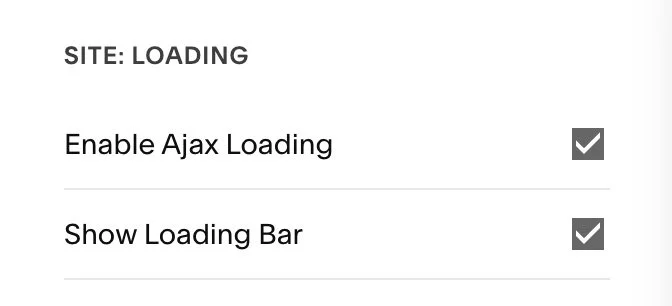
Scroll down to SITE: LOADING.
Uncheck Enable Ajax Loading.
Coding Advice
If you are writing your own JavaScript for a Squarespace 7.0 site, it may be helpful to know the following.
Injection
On Squarespace sites with Ajax disabled, you can insert JavaScript into any of these locations and it will run every time the page loads:
Site Header
Site Footer
Page Header
Code Block
Markdown Block
Squarespace sites with Ajax enabled, JavaScript will only run the FIRST time a page is loaded when a visitor arrives on your site.
So for example, if someone sees you listed on Google, and clicks on the result to open your site, JavaScript in any of the locations listed above will run. Once. But never again. When the visitor clicks on other links on your site, they will be taken to the new content but the JavaScript will never run again. Ever.
So how do we deal with this? Surely we need the JavaScript to load? Well actually no, we don’t want all that code to load again because it slows things down, but it does require us to think differently.
If you want your code to run the next time a page is opened, you need to make the SAME code run AGAIN.
Document Ready
When Ajax is enabled on your site, Squarespace’s Mercury loader takes care of loading page data instead of the standard one that triggers the usual DOM loading event triggers in JavaScript and jQuery. We call these Ajax-enabled or Mercury sites.
If your code is using $(document).ready or Y.on('domready', or window.onload then you’ll need to replace this with something that fires when either of two events happens:
The DOM has loaded (because of a refresh or because the visitor has just arrived on the site)
The Mercury Loader has just loaded the page (because the visitor clicked a link on another page of this site)
There are a number of ways to do this.
One is to use window.Squarespace.onInitialize instead. This will call a function on either of these events. In many cases, you can do this by replacing this line of code:
$(document).ready(function() {
with the following line:
window.Squarespace.onInitialize(Y, function(){
Another is to add an Event Listener to DOMContentLoaded (as you would on a non-Mercury site) and add another Event Listener to mercury:load. Both should call the same function so that it triggers on either event.
