
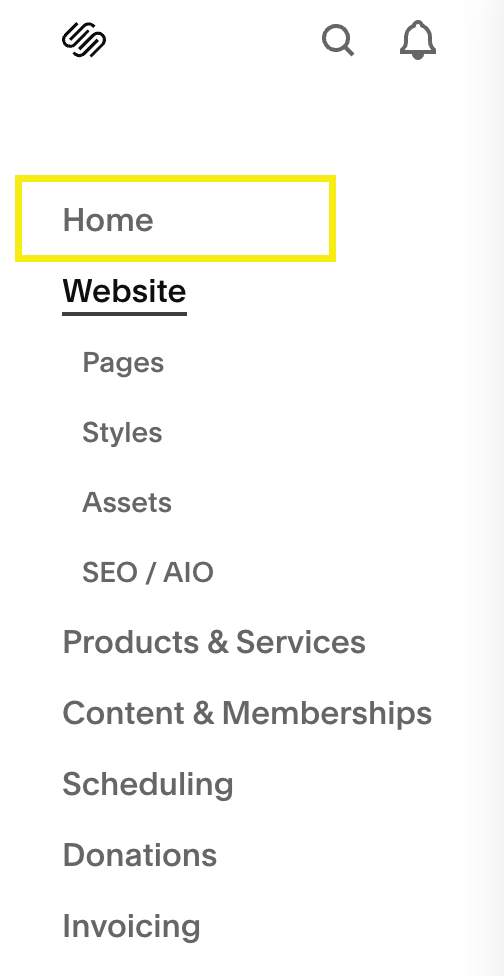
If you’ve logged into Squarespace recently, you may have noticed a new “Home” link mysteriously appearing in the left-hand navigation of the editor.
But why?
Squarespace explains that this is part of their new “Home Dashboard” - a centralised area designed to help site owners view setup guides, analytics, and business insights. It’s meant to be a kind of “mission control”. That’s fine in theory, but for many of us the addition has caused more confusion than convenience. Clients naturally assume “Home” means their website homepage, not a separate dashboard.
In summary, I don’t like it, and many highly regarded Squarespace designers agree.
Restore your sanity
Until Squarespace gives us an official toggle, you can hide “Home” easily with a simple script. This is a safe snippet that removes the “Home” link only in the editor interface, without touching anything on your live site or preview pages. Add it to the Code Injection “Footer” section.
<!---- Remove "Home" option from Config UI on this website --------------->
<script>
(() => {
  try {
    if (window.top === window) return;
    if (!/\.squarespace\.com$/i.test(window.top.location.hostname)) return;
    console.log('Removing Home from Config UI');
    window.top.document.head.insertAdjacentHTML(
      'beforeend',
      `
<style>
  [data-testid="primary-nav-item-wrapper"]:has([data-id="/home"]) {
    display: none !important;
  }
</style>
`
    );
  } catch (e) {
    // Nothing to see
  }
})();
</script>
How it works
This code checks whether the user is logged on to the website as an editor. It does this to avoid adding the CSS when the site is being viewed by a visitor. If the site is being viewed as a visitor, it does nothing. If the user is logged on to the site, it adds a line of CSS hat hides the “Home” element at the top of the Config UI.
Hopefully Squarespace will eventually hide or disable this dashboard but, until then, this little snippet restores some sanity to the interface.
