You can now add drag and drop custom font files directly into Squarespace without custom CSS!
You can add OTFs, TTFs, and WOFFs (type 1 and type 2) directly into your Squarespace site editor, and then select them directly from the Fonts panel within Site Styles!
Font Formats
Before you start, you’ll need to have your custom font files available. In summary, if you have the WOFF2 format of the file, use this! If not, here are some of the formats you can use.
Web Open Font Format (WOFF): WOFF was developed in 2009 as a wrapper format for TrueType and OpenType fonts. It compresses the files and is supported by all modern browsers.
Web Open Font Format 2 (WOFF2): WOFF2 is an update to the original WOFF format. Developed by Google, this is considered the best format of the bunch because it offers smaller file sizes and better performance for modern browsers that support it.
Embedded OpenType (EOT): EOT is a legacy format developed by Microsoft. Older Internet Explorer versions require EOT to render your web fonts. EOT is often served uncompressed so, if you don’t need to support really old browsers like IE8, then you’re better off leaving it out.
TrueType (TTF): TTF is a font format developed by Microsoft and Apple in the 1980s. Modern TTF files are also called TrueType OpenType fonts. TTF can be useful for extending support to some older browsers, especially on mobile, if you need it.
How to upload fonts to Squarespace
Go to the Site Styles panel
Access the Fonts panel
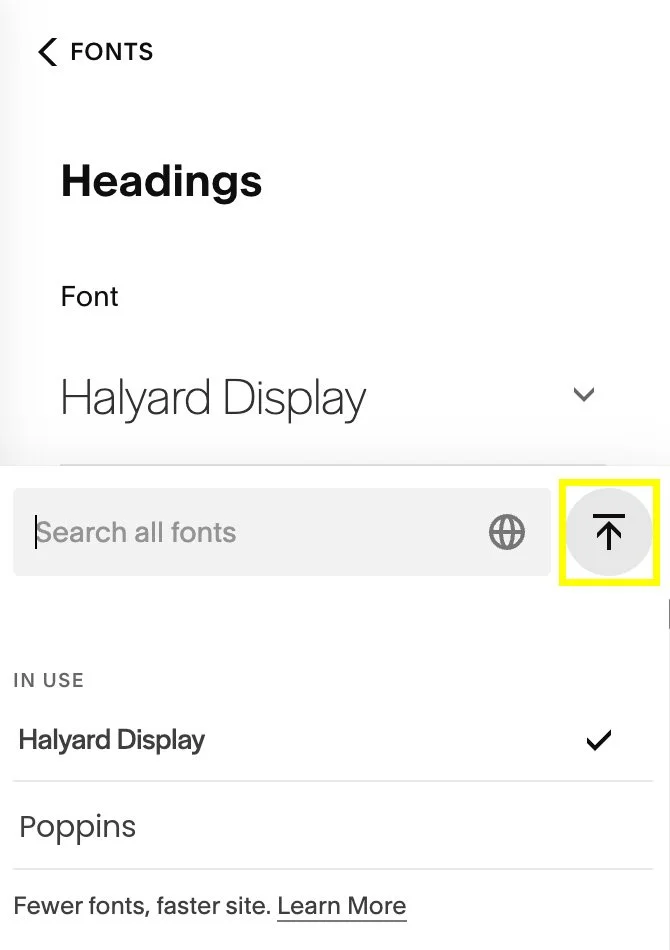
Where you select a font name, you’ll now see an upload icon (shaped like an up arrow pointing to a horizontal line).
Click on the upload icon to access the uploaded font manager, where you can upload and manage your font families and variants.