

Continue shopping button for Squarespace
Improve your purchase experience
Add a Continue Shopping button to your cart

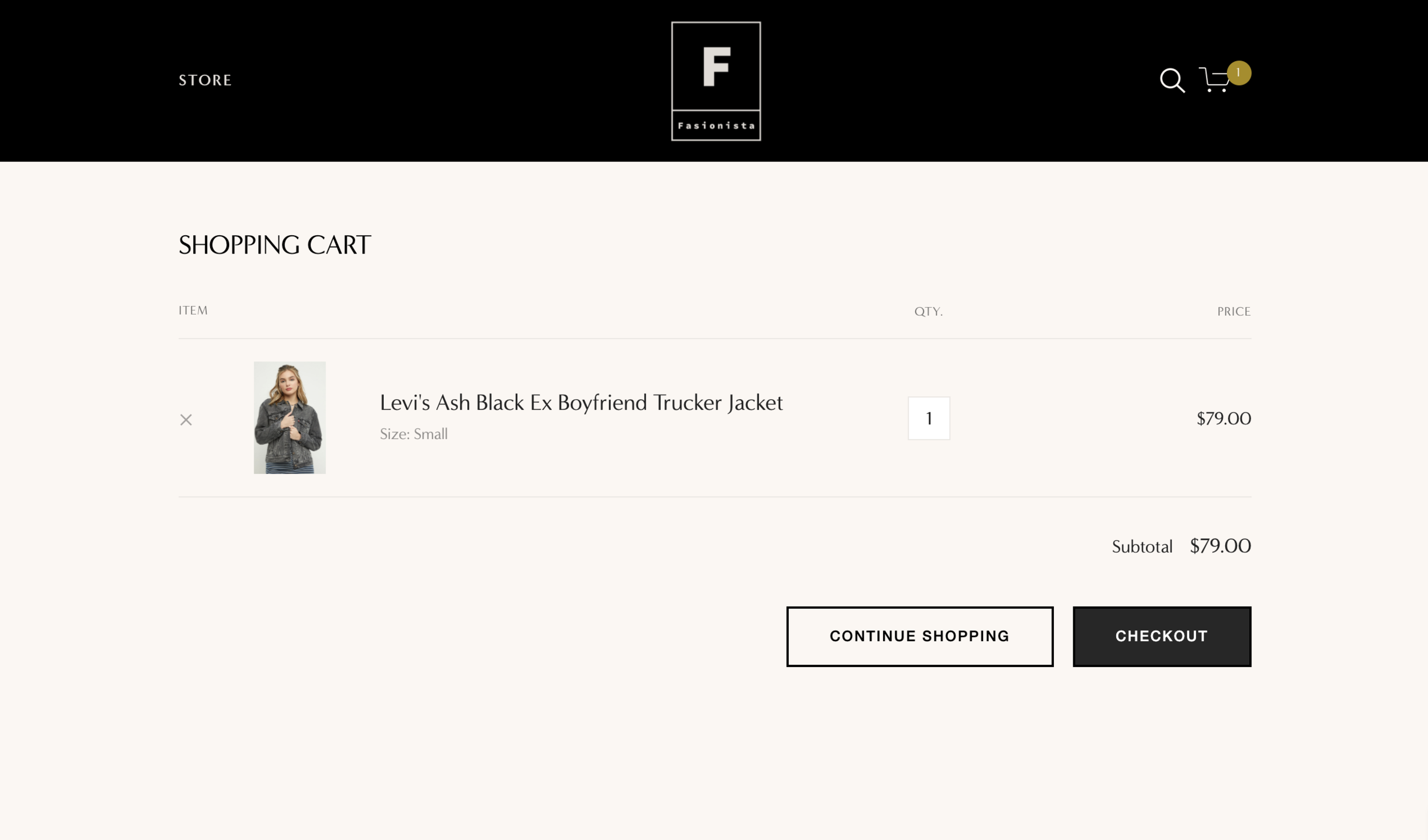
Make it easier for customers to return to your store from the cart. Add a “Continue Shopping” button that takes them back to a page of your choice.
The button appears right beside the “Checkout” button on the cart page of desktop, tablet and mobile.
Why do I need the Continue Shopping button?
Make it easier for customers to return to your store from the cart page. Add a “Continue Shopping” button to the cart page that takes them back to a page of your choice. The button appears right beside the “Checkout” button on the cart page of desktop, tablet and mobile.



Built for Squarespace
Supports all Squarespace websites

Simple installation
We supply full installation instructions and customised code.

Increase sales
Increase turnover by guiding customers
Add a Continue Shopping button to the cart page
Make it easier for customers to return to your store from the cart. Add a “Continue Shopping” button that takes them back to a page of your choice.
The button appears right beside the “Checkout” button on the cart page of desktop, tablet and mobile.
We’re testing a new checkout experience. Please contact us if you face any issues.
Examples




Our plugin is installed on the websites shown above. The inclusion of these examples does not imply a recommendation, nor does it indicate that we were involved in the design of these sites. These websites may be copyrighted and/or trademarked by the businesses or organisations they reference. The screenshots and links have been published in good faith and for general information purpose only. Content can change without notice, so it may be possible that the plugin has been removed or disabled from any of these sites before we have had the opportunity to remove a link.
Specification and limitations
Our goal is to be completely honest and transparent, so we clearly list the full product specification and limitations of each product. This isn’t “small print” or “fine print”. This is important information that you should read carefully to ensure the product will meet your needs - before ordering. If you have any questions, we’re here to help.
This plugin adds a “Continue Shopping” button to the bottom of the Squarespace Cart page. Clicking or tapping the “Continue Shopping” button returns the user to either a specific URL or the previous page, depending on which setting you select during installation.
The button appears to the left of the “Checkout” button on desktop, and above the “Checkout” button on mobile (see the example screenshots above).
You can choose your own label for the button - for example, “Mit dem Einkaufen fortfahren”, “Continuer vos achats” or “Return to store”.
This product is compatible with sites using Afterpay and Clearpay.
This plugin does not add any buttons or features to Product pages. To add buttons to Product pages, please see our Cart Popover plugin.
This plugin does not affect the Checkout page (the page that appears after the cart page). The Checkout page cannot be modified by anyone because Squarespace do not allow code to be added to the Checkout page.
This plugin should not be used with the Wishlist plugin. For your convenience, the Continue Shopping button is already included in the latest version of the Wishlist plugin.
The Express Checkout feature should be disabled, otherwise customers will not see the Cart page.
On Squarespace, the Cart page is not shown to customers who click Subscribe to purchase a Subscription product (including Member Areas) or who click Purchase to buy a Gift Card. At present, these customers are sent directly to a Checkout page, completely bypassing the Cart. Squarespace requires them to confirm their order for a single subscription or gift card on its own, without adding other products to their cart. We hope that Squarespace will remove this limitation in 2025/2026.
If you have any questions or concerns, please contact us via online chat (when available) or our presales page and we will be able to confirm compatibility before you purchase. Please note that we must be able to access your site so if it is in a trial, you’ll need to set a public password and share it with us.
This plugin is compatible with all websites built with original Squarespace templates on their latest platform, known as Squarespace 7.1, including those using Fluid Engine Squarespace’s newest editing experience. If you are using Squarespace’s older platform (known as version 7.0) then you may want to use the free Squarespace Update Tool to upgrade your website from version 7.0 to version 7.1. To check which version of Squarespace you are using, go to Website and look for the Design option. If the Design option is missing then you are using the latest version of Squarespace, version 7.1! If you do see the Design option, you're using an older version 7.0 template.
Your website must be on at least a Business or Core billing plan. The plugin cannot be installed on the Personal or Basic plan. You can upgrade your website billing plan at any time. For more information on Squarespace Billing Plans, see Choosing the right Squarespace plan.
When you purchase the plugin, you get a single copy of the software for use on the single website specified on the order form. To protect our rights, the plugin is not transferable and will stop working if the built-in Squarespace domain name or the primary domain name does not match the details supplied on the order form.
Squarespace make frequent changes to their Software and their Services. These changes are outside of our control, and we cannot guarantee that our plugins will be compatible with future changes. Please note that this is true for all Squarespace plugin and code snippets; it is not limited to our Software but we want you to know this because we believe in honesty and transparency. We highly recommend our optional support subscriptions. A subscription ensures your product remains fully supported throughout its lifetime. Email support is available whilst your subscription is active. You can cancel the subscription at any time from your account panel, but doing so will cancel all our support obligations for the Software.
As specified in our Terms and Conditions, we cannot guarantee that the Software will be compatible with third party code, plugins, customisations or integrations installed on the Squarespace website. In particular, this product is not compatible with the Weglot Visual Editor or with third party plugins that create a “cart drawer” in place of the cart page.
Our plugin are compatible with all the current web browsers that support modern web standards including Chrome, Safari, Firefox and Edge. Our plugins are not designed to be compatible with older browsers such as Internet Explorer or those that do not support modern web standards.