

Product Breadcrumbs for Squarespace
The Product Breadcrumbs plugin helps customers navigate your store more easily - like a map in a physical store
Why do I need Product Breadcrumbs?
Make it easier for users to move between categories and find more products.
A breadcrumb trail on a product description page is a form of site navigation. It helps visitors to understand a product’s position in the store hierarchy. This can help users to explore your store more effectively, especially if you have a large number of product categories. A visitor can navigate all the way up in the product hierarchy, one level at a time, by starting from the last breadcrumb in the breadcrumb trail where they were viewing a product.
Breadcrumbs can lower bounce rates because you're offering visitors an alternative way to browse your site in an organic fashion. For example, on a typical product page, you might see a breadcrumb trail that looks something like Store > Women > Dresses > Mini > Button Dress.

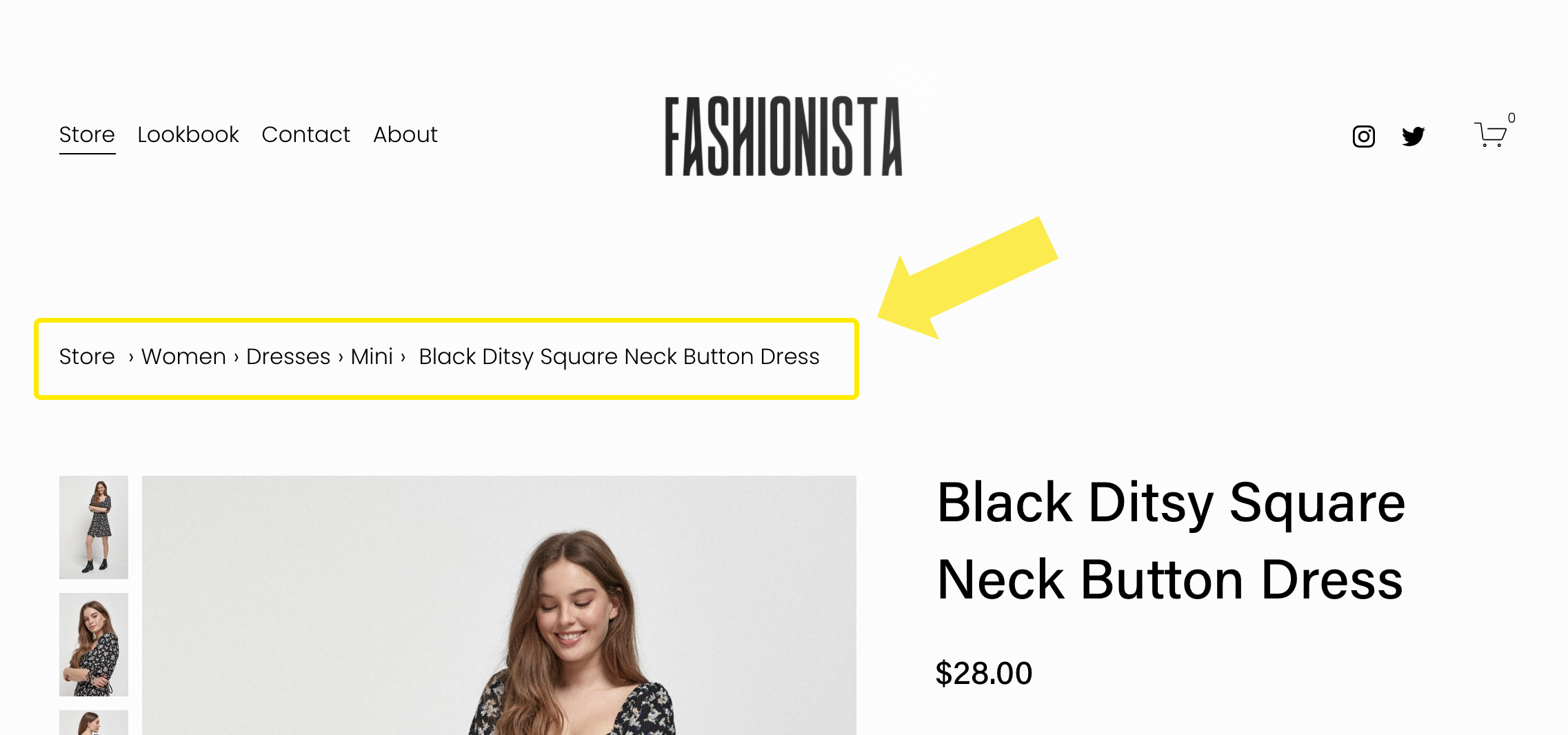
The Squarespace 7.1 Product Description Page (PDP) above is pictured before and after the Breadcrumbs plugin has been installed. Squarespace ‘breadcrumbs’ only show the name of the store page and the name of the product - the categories are missing!
When the Breadcrumbs plugin has been added, the nested categories are shown. In this example, you can see that the dress is in the Store under the nested categories of Women, Dresses and Mini. A visitor can click on any of these to be taken straight to that category within the store.

All 7.1 templates supported
Supports all Squarespace 7.1 templates.

Improved clickthrough
Breadcrumbs can lower bounce rates by encouraging browsing.

Increase sales
Increase turnover by guiding customers
Add breadcrumbs to product pages

Breadcrumbs are a secondary navigation aid that helps users easily understand the relationship between a product and other categories in an online store. The term is borrowed from the tale of Hansel and Gretel where they drop a trail of breadcrumbs to trace their way back home.
For more detailed information about this extension, please view the product page:
Please ensure the product will meet your needs before ordering by reading the specification and limitations below.
Specification and limitations
This isn’t “small print” or “fine print”. This is important information that you should read before purchasing this product. If you have any questions, we’re here to help.
This plugin adds a breadcrumb navigation to Product Description Pages (PDPs) pages. These are the product pages that show a single product. It does not make changes to other pages.
The plugin generates “Location Breadcrumbs” that describe the position of a product within the store hierarchy. Breadcrumbs are not intended to show the history of pages traversed during a session on the site (a la a browser’s native Back button); they are intended to show the hierarchical structure of the store. This has been the case for many years, but it still bears repeating because attempting to show a list of the pages a user has accessed won’t provide any benefit for users who arrive from an external link, which is one of the key uses of breadcrumbs.
Note that although Squarespace allows you to add multiple categories (and multiple nested categories) to products, only one trail of breadcrumbs can be shown for each product. If products on your site feature in more than one top-level category, you will need to specify the preferred category to use. Note that this is a site-wide setting that affects the entire site; you cannot set the preferred category for individual products.
If category names include symbols such as hyphens (“-”) or dashes, these symbols will not be displayed.
If you are using nested categories (categories within categories) then the breadcrumbs will show one trail through these breadcrumbs.
Clicking or tapping on any crumb will take the user to that category within the same store.
By default, breadcrumbs appear on desktop devices. This is because on mobile the cost of using breadcrumbs can quickly overwhelm the benefits, especially when they wrap to multiple lines, eating up valuable space on an already crowded mobile display. However, you can choose to show breadcrumbs on all devices if required, using a setting described in the installation guide.
This plugin is compatible with all websites built with original Squarespace templates on their latest platform, known as Squarespace 7.1, including those using Fluid Engine Squarespace’s newest editing experience. Older templates (version 7.0), “templates” sold by third parties and Developer Mode are not supported. To check which version of Squarespace you are using, go to Website and look for the Design option. If the Design option is unavailable then you are using the latest version of Squarespace, version 7.1! If you do see the Design option, you're using an older version 7.0 template. Note that Squarespace offer a free Squarespace Update Tool to help you upgrade your website from version 7.0 to version 7.1.
Your Squarespace website must be on a Business, Commerce, Core, Plus or Advanced billing plan. The plugin cannot be installed on a Personal or Basic plan. If you're on a Personal or Basic plan, you can upgrade at any time. For more information on Squarespace Billing Plans, see Choosing the right Squarespace plan.
When you purchase the plugin, you get a single copy of the software for use on the single website with the domain specified on the order form. To protect our rights, the plugin is not transferable between websites and/or domains. It will stop working if the built-in Squarespace domain name or the primary domain name does not match the details supplied on the order form.
Squarespace make frequent changes to their Software and their Services. These changes are outside of our control and so we cannot guarantee that our plugins will be compatible with future changes. Please note that this is true for all Squarespace plugins and code snippets; it is not limited to our Software. We want you to know this because we believe in honesty and transparency. We highly recommend our optional support subscriptions to ensure the product remains fully supported throughout its lifetime. Email support is available whilst your subscription is active. You can cancel the subscription at any time from your account panel, but doing so will cancel all our support obligations for the Software.
As specified in our Terms and Conditions, we cannot guarantee that the Software will be compatible with third party code, plugins, customisations or integrations installed on the Squarespace website. In particular, this product is not compatible with the Weglot Visual Editor.
Our plugins are not designed to be compatible with older browsers such as Internet Explorer. Microsoft killed off the Internet Explorer brand in 2015 and in 2019 they labeled Internet Explorer a “compatibility solution” rather than a browser and encouraged businesses to stop using the aging browser. It does not support modern web standards and so we don’t support it. Our plugins are compatible with all the current web browsers that support modern web standards.